Within hours, screenshots appeared online showing access to Uber's AWS console, Google Cloud Platform, the Duo MFA administration panel, SentinelOne EDR, internal VMware vSphere clusters, and private HackerOne bug reports. The intrusion required no zero-day exploit, no custom rootkit, and no code execution flaw. It relied on four everyday mistakes chained together: an infostealer on a personal computer, an MFA prompt that wore someone down, an open internal file share, and a PowerShell script with plain-text administrator credentials for the company's privileged access management (PAM) vault.
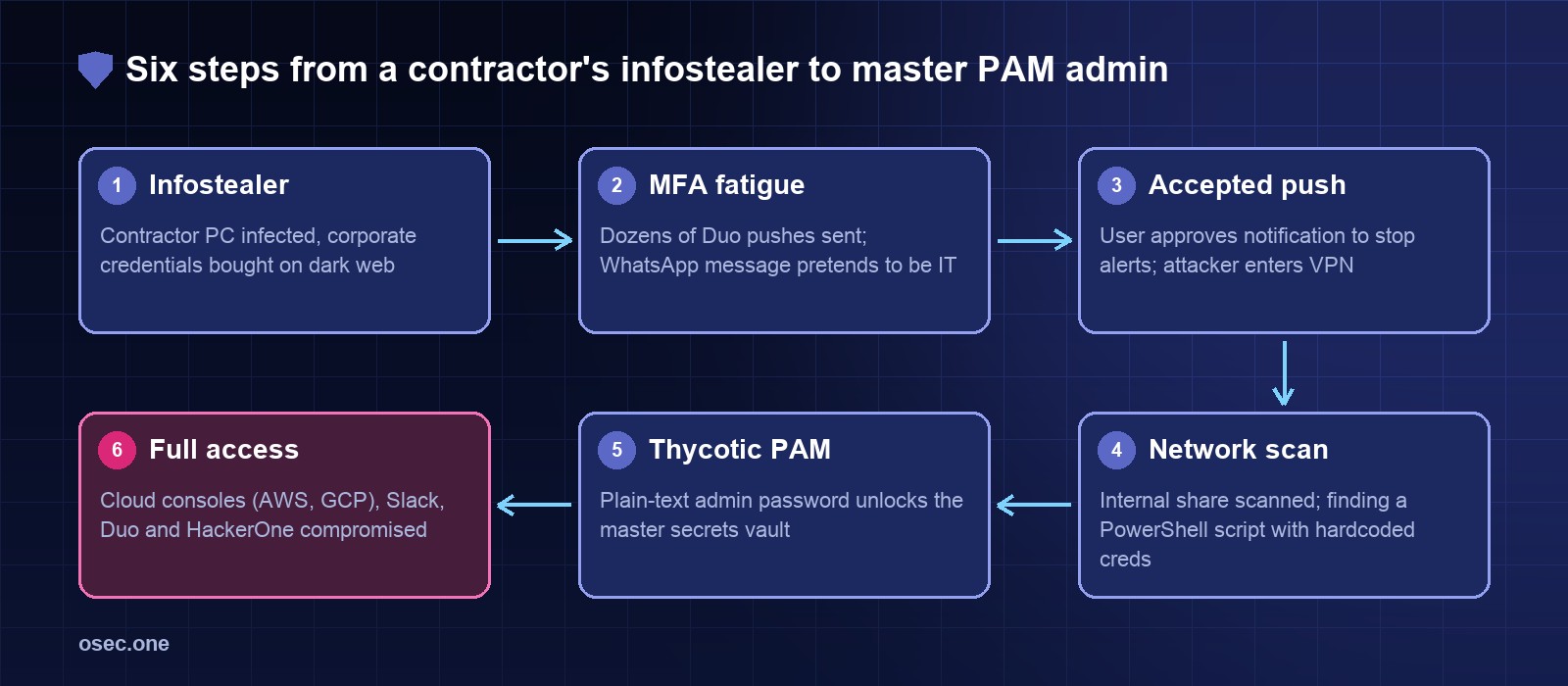
"},{"id":148177,"block_type":"screenshot","html":"The attack path: stolen credentials, MFA push bombing, a plain-text script, and total vault access."},{"id":148178,"block_type":"heading_h2","html":"
The timeline
"},{"id":148179,"block_type":"html","html":"
\n
When
What happened
Source
\n
Late Aug / Early Sep 2022
An external contractor's personal Windows computer is infected with malware (Raccoon or Vidar infostealer); corporate SSO passwords saved in the browser are harvested and dumped to dark web cybercrime logs
Uber security update, Group-IB
\n
14-15 Sep 2022
Attacker purchases the contractor's credentials on a dark web marketplace (Russian Market) for less than $10
Group-IB, BleepingComputer
\n
15 Sep 2022 (~7-8 PM EDT)
Attacker logs into Uber's corporate VPN; Duo two-factor prompts flood the contractor's phone for over an hour (MFA push bombing)
Uber security update, The Washington Post
\n
15 Sep 2022 (~8:15 PM EDT)
Attacker messages the contractor on WhatsApp posing as Uber IT support, claiming the buzzing will stop once approved; contractor taps \"Approve\"
Attacker interview with Corben Leo, BleepingComputer
\n
15 Sep 2022 (~8:30 PM EDT)
Attacker enters corporate intranet via VPN; scans internal SMB network shares for scripts and configuration files
Uber security update
\n
15 Sep 2022 (~8:50 PM EDT)
A PowerShell script on a network share is found containing hardcoded master admin credentials for Thycotic Secret Server (Uber's PAM vault)
BleepingComputer, Yuga Labs security analysis
\n
15 Sep 2022 (~9:00 PM EDT)
PAM vault unlocked: attacker extracts high-privilege keys for AWS, GCP, Duo admin, SentinelOne console, Slack, and HackerOne
Attacker screenshots, The New York Times
\n
15 Sep 2022 (~9:30 PM EDT)
Attacker posts to Slack #announcements and redirects internal OpenDNS; employees report incident to security team
Uber security update
\n
16 Sep 2022
Uber freezes code deployments, disables compromised internal tools, rotates secrets, and brings in Mandiant and the FBI
Uber newsroom
\n
19 Sep 2022
Uber confirms Lapsus$ affiliation, contractor malware source, and confirms customer databases and financial accounts remained untouched
Uber official update
\n
Oct 2022
CISA issues an urgent advisory advising all organizations to deploy number matching and eliminate simple push MFA
CISA Fact Sheet
\n
8 May 2023
Microsoft enforces number matching globally for all Microsoft Authenticator push requests to eradicate push fatigue
Step 1: The contractor password bought for pocket money
"},{"id":148181,"block_type":"paragraph","html":"
The break-in started days before the actual attack. An external contractor working with Uber had their personal device infected with malware, likely after downloading pirated software or clicking a malicious link. The malware was an infostealer (security researchers identified Raccoon or Vidar), which scans local SQLite databases in Google Chrome, Microsoft Edge, and Firefox to steal stored passwords, cookies, and auto-fill tokens.
"},{"id":148182,"block_type":"paragraph","html":"
• Infostealer economics: Stolen credential bundles are packaged into "stealer logs" and sold in bulk on underground markets like Russian Market and 2easy for $5 to $10 each. • The corporate leak: The contractor had logged into Uber's corporate portal on their personal machine and allowed the browser to save their corporate SSO password. • No alerts fired: Because the theft happened on an unmanaged personal computer outside Uber's network, no corporate endpoint detection or security agent saw it happen.
"},{"id":148183,"block_type":"paragraph","html":"
This highlights a recurring enterprise blind spot: if contractors or staff access corporate portals from personal machines without device-health checks, your corporate security perimeter is only as clean as their family computer.
Step 2: Push bombing and the WhatsApp fake IT message
"},{"id":148185,"block_type":"paragraph","html":"
With the valid username and password, the attacker connected to Uber's corporate VPN login portal. Uber required multi-factor authentication powered by Duo. Every time the attacker attempted to sign in, Duo sent a push notification to the contractor's smartphone: "Approve sign-in?"
"},{"id":148186,"block_type":"paragraph","html":"
The contractor initially denied the prompts. But the attacker didn't stop. They launched an automated loop of login attempts, sending push after push for over an hour. In security terms, this is known as push bombing or MFA fatigue.
"},{"id":148187,"block_type":"paragraph","html":"
When continuous buzzing wasn't quite enough, the attacker added social engineering: they reached out directly to the contractor on WhatsApp, posing as an Uber IT support specialist. The message explained that the continuous notifications were caused by a system glitch and asked the contractor to approve the next prompt so the team could fix it. Exhausted and believing the message was genuine, the contractor tapped Approve.
A push prompt with a single "Approve" button only proves someone holding the phone wanted the buzzing to stop. It proves nothing about whether they initiated the sign-in.
Step 3: VPN entry and scanning open network shares
"},{"id":148190,"block_type":"paragraph","html":"
With MFA approved, the attacker landed inside Uber's internal network via the corporate VPN. Under strict zero-trust architecture, a contractor's account should only reach the specific servers and applications required for their job. Here, the network was relatively flat.
"},{"id":148191,"block_type":"paragraph","html":"
The attacker began mapping internal Windows file shares (SMB/CIFS shares accessible across the domain). They were hunting for files with extensions like .ps1, .bat, .config, .env, and .kdbx—the usual places IT teams accidentally leave maintenance tools.
"},{"id":148192,"block_type":"paragraph","html":"
On an open network share readable by regular domain users, they found what they were looking for: an internal PowerShell script created by IT for administrative automation. Right inside the script was a set of hardcoded master administrator credentials for Thycotic Secret Server, Uber's Privileged Access Management (PAM) vault.
A Privileged Access Management system is built to protect the crown jewels: it stores root passwords, API keys, service tokens, and cloud administrative credentials. But leaving master admin credentials for the PAM server inside an unencrypted script on a shared folder turns the vault inside out.
"},{"id":148195,"block_type":"paragraph","html":"
Using the hardcoded credentials, the attacker unlocked the Thycotic vault and exported administrative secrets for nearly every major platform in Uber's environment:
"},{"id":148196,"block_type":"paragraph","html":"
• Cloud consoles: Complete admin access to Amazon Web Services (AWS) and Google Cloud Platform (GCP) accounts. • Identity & MFA: Administrative access to the Duo Security console, letting the intruder reconfigure MFA policies or register new hardware devices. • Endpoint protection: Full access to Uber's SentinelOne console, where an attacker could view alerts, silence detections, or uninstall security agents. • Internal communications: Access to Uber's Slack enterprise grid, enabling the intruder to read internal engineering chats, download files, and post company-wide announcements. • Vulnerability disclosures: Access to Uber's private HackerOne bug bounty dashboard, exposing unresolved vulnerability reports submitted by security researchers.
"},{"id":148197,"block_type":"paragraph","html":"
Uber's post-incident investigation found no evidence that production databases storing user trip histories, customer payment card numbers, or bank account information were accessed. But in terms of internal corporate control, the intruder held root access across the company.
Comparing MFA factors: Why simple push is obsolete
"},{"id":148199,"block_type":"paragraph","html":"
If your sign-in still asks users to tap a simple "Approve" button on their phone, you are exposed to the same fatigue attack. Here is how modern MFA factors compare against push bombing, phishing, and day-to-day implementation:
"},{"id":148200,"block_type":"html","html":"
\n
MFA factor
How it works
Push fatigue resistance
Phishing / AiTM resistance
Deployment & cost
\n
Simple mobile push (Approve / Deny)
Push notification sent to authenticator app; user taps \"Approve\"
None: repeated pushes wear down users until they approve
Zero: attacker triggers push simultaneously with credential submission
Low cost; standard in older Duo, Okta, and Microsoft setups
\n
Number matching (Verified push)
Login screen displays a 2-digit number; user must type that exact number into their mobile app
High: attacker cannot see the number on the user's screen; blind approvals are impossible
Moderate: real-time phishing proxies can relay the number, but stops remote brute force
Free configuration toggle in Microsoft Entra ID and Duo; minimal training required
\n
Rolling TOTP code (6-digit code)
App generates a 6-digit code refreshing every 30 seconds (RFC 6238)
Immune to push fatigue: no notifications are pushed to the device
Low: phishable via reverse proxy kits (Evilginx, Tycoon2FA) that relay the code
Free; supported by Google Authenticator, Bitwarden, 1Password, and YubiKey
\n
FIDO2 / WebAuthn (Passkeys & YubiKeys)
Hardware cryptographic challenge cryptographically bound to the browser's exact domain
Immune: no push requests or notification loops exist
Complete: browser verifies origin; keys refuse to authenticate fake or proxy domains
Free for platform passkeys (Touch ID, Windows Hello); $25-$50 per physical USB/NFC key
How to audit your network shares for hardcoded credentials
"},{"id":148202,"block_type":"paragraph","html":"
Hardcoded credentials in internal scripts are not unique to Uber; they exist in almost every corporate network. Sysadmins write quick PowerShell or Bash scripts to back up databases or rotate certificates, embed passwords to make scheduled tasks run unattended, and save them on shared folders. Here is how to find and clean them up:
"},{"id":148203,"block_type":"paragraph","html":"
1. Map accessible network shares: Run an inventory from an ordinary domain account to see which SMB shares have overly permissive read access (Everyone or Domain Users). 2. Filter high-risk file extensions: Search specifically for script and configuration formats: .ps1, .bat, .cmd, .config, .xml, .env, .ini, .kdbx, and .rdp. 3. Scan file contents for credential patterns: Search for keywords like password=, pwd=, api_key=, secret=, thycotic, and vault. 4. Automate share discovery with tools: Run open-source security tools like Snaffler in your Active Directory environment to spot loose permissions and credential dumps automatically.
"},{"id":148204,"block_type":"paragraph","html":"
Below is a ready-to-run PowerShell script you can execute in your environment to audit internal shares for sensitive files and exposed passwords:
Every stage of the Uber breach had an available control that would have severed the attack chain. Here is what stops each link in the attack:
"},{"id":148208,"block_type":"html","html":"
\n
Attack stage
Vulnerability exploited
Defense control
Implementation notes
\n
1. Contractor credential theft
Infostealer malware harvested corporate password from personal browser
Enforce device posture & Zero BYOD for corporate SSO
Require MDM enrollment and EDR compliance before allowing access to corporate identity portals; wipe cached sessions on unmanaged endpoints.
\n
2. Push bombing / MFA fatigue
Over an hour of repeated Duo push prompts wore down the contractor
Number matching & push rate-limiting
Require typing a 2-digit number; lock accounts and trigger high-priority SOC alerts after 3 rejected pushes in 15 minutes.
\n
3. Social engineering lure
WhatsApp message impersonating internal Uber IT support
Verified IT contact channels & reporting buttons
Establish verified, out-of-band communication procedures for IT help desk requests; provide a 1-tap \"Report Fraudulent Push\" button in the MFA app.
\n
4. Flat corporate VPN access
Contractor account had wide internal network access across corporate subnets
Strict network micro-segmentation
Place contractors in isolated VLANs; prohibit remote access pools from connecting directly to internal file shares and administrative management interfaces.
\n
5. PowerShell script on network share
Plain-text master admin credentials hardcoded in an SMB script
Automated secret scanning & share ACL hardening
Remove Domain Users and Everyone permissions from file shares; audit CI/CD and scripts with secret scanners; replace static credentials with Managed Identities.
\n
6. Total PAM vault access
Single set of master credentials gave total access to all corporate vaults
Hardware-bound MFA & dual-custody access
Mandate FIDO2 security keys for PAM vault administrator logins; enforce dual-custody approval for checkouts; alert on unusual bulk secret exports.
The 2022 Uber intrusion confirmed what security teams have long warned about: authentication mechanisms that rely on human willpower alone will eventually fail. When faced with continuous buzzing late at night, someone will tap Approve just to go to sleep.
"},{"id":148211,"block_type":"paragraph","html":"
• Turn on number matching today: If you use Microsoft Entra ID, Duo, or Okta, turn off simple push approvals immediately and require number matching. It takes minutes to enable and eliminates push bombing entirely. • Audit your file shares: Run a recursive scan on your internal network shares. Treat any password found in a script or configuration file as already compromised. • Move to phishing-resistant MFA: Password managers and rolling codes help, but only FIDO2 security keys and passkeys cryptographically bind the login to the real domain. • Learn from similar intrusions: Compare this with 0ktapus in 2022, where SMS phishing phished Twilio but Cloudflare's security keys held; Retool in 2023, where cloud-synced Google Authenticator seeds exposed customer accounts; and LastPass in 2022, where a vulnerable home media server compromised corporate vault keys.
"},{"id":148212,"block_type":"paragraph","html":"
If you manage authentication for your own web application, monitor failed login velocity and rapid push requests per account rather than just per IP. osec Login Protection detects rapid credential stuffing and push fatigue patterns without requiring DNS changes. For developers running automated deployment pipelines, run osec Workflow Risk Check to prevent hardcoded secrets from slipping into automation scripts, and test your external perimeter certificates and exposed VPN endpoints with osec SSL Checker.
"},{"id":148213,"block_type":"cta","html":"
Want to eliminate password leaks and push fatigue for your users entirely? osec Auth adds passkey, Apple, and Google sign-in to any application without storing passwords or managing OAuth complexity.
On the night of 15 September 2022, an 18-year-old attacker affiliated with the Lapsus$ group broke into Uber's internal network. Around 9:00 PM EDT, staff noticed an unexpected announcement in the company-wide Slack #announcements channel: "I announce I am a hacker and Uber has suffered a data breach." Several employees reacted with celebration emojis, assuming a colleague was pulling an elaborate prank. It was not a prank.
\n
Ad
\n
Within hours, screenshots appeared online showing access to Uber's AWS console, Google Cloud Platform, the Duo MFA administration panel, SentinelOne EDR, internal VMware vSphere clusters, and private HackerOne bug reports. The intrusion required no zero-day exploit, no custom rootkit, and no code execution flaw. It relied on four everyday mistakes chained together: an infostealer on a personal computer, an MFA prompt that wore someone down, an open internal file share, and a PowerShell script with plain-text administrator credentials for the company's privileged access management (PAM) vault.
\n
The attack path: stolen credentials, MFA push bombing, a plain-text script, and total vault access.
\n
The timeline
\n
\n
When
What happened
Source
\n
Late Aug / Early Sep 2022
An external contractor's personal Windows computer is infected with malware (Raccoon or Vidar infostealer); corporate SSO passwords saved in the browser are harvested and dumped to dark web cybercrime logs
Uber security update, Group-IB
\n
14-15 Sep 2022
Attacker purchases the contractor's credentials on a dark web marketplace (Russian Market) for less than $10
Group-IB, BleepingComputer
\n
15 Sep 2022 (~7-8 PM EDT)
Attacker logs into Uber's corporate VPN; Duo two-factor prompts flood the contractor's phone for over an hour (MFA push bombing)
Uber security update, The Washington Post
\n
15 Sep 2022 (~8:15 PM EDT)
Attacker messages the contractor on WhatsApp posing as Uber IT support, claiming the buzzing will stop once approved; contractor taps \"Approve\"
Attacker interview with Corben Leo, BleepingComputer
\n
15 Sep 2022 (~8:30 PM EDT)
Attacker enters corporate intranet via VPN; scans internal SMB network shares for scripts and configuration files
Uber security update
\n
15 Sep 2022 (~8:50 PM EDT)
A PowerShell script on a network share is found containing hardcoded master admin credentials for Thycotic Secret Server (Uber's PAM vault)
BleepingComputer, Yuga Labs security analysis
\n
15 Sep 2022 (~9:00 PM EDT)
PAM vault unlocked: attacker extracts high-privilege keys for AWS, GCP, Duo admin, SentinelOne console, Slack, and HackerOne
Attacker screenshots, The New York Times
\n
15 Sep 2022 (~9:30 PM EDT)
Attacker posts to Slack #announcements and redirects internal OpenDNS; employees report incident to security team
Uber security update
\n
16 Sep 2022
Uber freezes code deployments, disables compromised internal tools, rotates secrets, and brings in Mandiant and the FBI
Uber newsroom
\n
19 Sep 2022
Uber confirms Lapsus$ affiliation, contractor malware source, and confirms customer databases and financial accounts remained untouched
Uber official update
\n
Oct 2022
CISA issues an urgent advisory advising all organizations to deploy number matching and eliminate simple push MFA
CISA Fact Sheet
\n
8 May 2023
Microsoft enforces number matching globally for all Microsoft Authenticator push requests to eradicate push fatigue
Microsoft Security
\n
\n
Step 1: The contractor password bought for pocket money
\n
The break-in started days before the actual attack. An external contractor working with Uber had their personal device infected with malware, likely after downloading pirated software or clicking a malicious link. The malware was an infostealer (security researchers identified Raccoon or Vidar), which scans local SQLite databases in Google Chrome, Microsoft Edge, and Firefox to steal stored passwords, cookies, and auto-fill tokens.
\n
• Infostealer economics: Stolen credential bundles are packaged into "stealer logs" and sold in bulk on underground markets like Russian Market and 2easy for $5 to $10 each. • The corporate leak: The contractor had logged into Uber's corporate portal on their personal machine and allowed the browser to save their corporate SSO password. • No alerts fired: Because the theft happened on an unmanaged personal computer outside Uber's network, no corporate endpoint detection or security agent saw it happen.
\n
This highlights a recurring enterprise blind spot: if contractors or staff access corporate portals from personal machines without device-health checks, your corporate security perimeter is only as clean as their family computer.
\n
Step 2: Push bombing and the WhatsApp fake IT message
\n
With the valid username and password, the attacker connected to Uber's corporate VPN login portal. Uber required multi-factor authentication powered by Duo. Every time the attacker attempted to sign in, Duo sent a push notification to the contractor's smartphone: "Approve sign-in?"
\n
The contractor initially denied the prompts. But the attacker didn't stop. They launched an automated loop of login attempts, sending push after push for over an hour. In security terms, this is known as push bombing or MFA fatigue.
\n
When continuous buzzing wasn't quite enough, the attacker added social engineering: they reached out directly to the contractor on WhatsApp, posing as an Uber IT support specialist. The message explained that the continuous notifications were caused by a system glitch and asked the contractor to approve the next prompt so the team could fix it. Exhausted and believing the message was genuine, the contractor tapped Approve.
\n
A push prompt with a single "Approve" button only proves someone holding the phone wanted the buzzing to stop. It proves nothing about whether they initiated the sign-in.
\n
Step 3: VPN entry and scanning open network shares
\n
With MFA approved, the attacker landed inside Uber's internal network via the corporate VPN. Under strict zero-trust architecture, a contractor's account should only reach the specific servers and applications required for their job. Here, the network was relatively flat.
\n
The attacker began mapping internal Windows file shares (SMB/CIFS shares accessible across the domain). They were hunting for files with extensions like .ps1, .bat, .config, .env, and .kdbx—the usual places IT teams accidentally leave maintenance tools.
\n
On an open network share readable by regular domain users, they found what they were looking for: an internal PowerShell script created by IT for administrative automation. Right inside the script was a set of hardcoded master administrator credentials for Thycotic Secret Server, Uber's Privileged Access Management (PAM) vault.
\n
Step 4: Master keys to the PAM vault
\n
A Privileged Access Management system is built to protect the crown jewels: it stores root passwords, API keys, service tokens, and cloud administrative credentials. But leaving master admin credentials for the PAM server inside an unencrypted script on a shared folder turns the vault inside out.
\n
Using the hardcoded credentials, the attacker unlocked the Thycotic vault and exported administrative secrets for nearly every major platform in Uber's environment:
\n
• Cloud consoles: Complete admin access to Amazon Web Services (AWS) and Google Cloud Platform (GCP) accounts. • Identity & MFA: Administrative access to the Duo Security console, letting the intruder reconfigure MFA policies or register new hardware devices. • Endpoint protection: Full access to Uber's SentinelOne console, where an attacker could view alerts, silence detections, or uninstall security agents. • Internal communications: Access to Uber's Slack enterprise grid, enabling the intruder to read internal engineering chats, download files, and post company-wide announcements. • Vulnerability disclosures: Access to Uber's private HackerOne bug bounty dashboard, exposing unresolved vulnerability reports submitted by security researchers.
\n
Uber's post-incident investigation found no evidence that production databases storing user trip histories, customer payment card numbers, or bank account information were accessed. But in terms of internal corporate control, the intruder held root access across the company.
\n
Comparing MFA factors: Why simple push is obsolete
\n
If your sign-in still asks users to tap a simple "Approve" button on their phone, you are exposed to the same fatigue attack. Here is how modern MFA factors compare against push bombing, phishing, and day-to-day implementation:
\n
\n
MFA factor
How it works
Push fatigue resistance
Phishing / AiTM resistance
Deployment & cost
\n
Simple mobile push (Approve / Deny)
Push notification sent to authenticator app; user taps \"Approve\"
None: repeated pushes wear down users until they approve
Zero: attacker triggers push simultaneously with credential submission
Low cost; standard in older Duo, Okta, and Microsoft setups
\n
Number matching (Verified push)
Login screen displays a 2-digit number; user must type that exact number into their mobile app
High: attacker cannot see the number on the user's screen; blind approvals are impossible
Moderate: real-time phishing proxies can relay the number, but stops remote brute force
Free configuration toggle in Microsoft Entra ID and Duo; minimal training required
\n
Rolling TOTP code (6-digit code)
App generates a 6-digit code refreshing every 30 seconds (RFC 6238)
Immune to push fatigue: no notifications are pushed to the device
Low: phishable via reverse proxy kits (Evilginx, Tycoon2FA) that relay the code
Free; supported by Google Authenticator, Bitwarden, 1Password, and YubiKey
\n
FIDO2 / WebAuthn (Passkeys & YubiKeys)
Hardware cryptographic challenge cryptographically bound to the browser's exact domain
Immune: no push requests or notification loops exist
Complete: browser verifies origin; keys refuse to authenticate fake or proxy domains
Free for platform passkeys (Touch ID, Windows Hello); $25-$50 per physical USB/NFC key
\n
\n
How to audit your network shares for hardcoded credentials
\n
Hardcoded credentials in internal scripts are not unique to Uber; they exist in almost every corporate network. Sysadmins write quick PowerShell or Bash scripts to back up databases or rotate certificates, embed passwords to make scheduled tasks run unattended, and save them on shared folders. Here is how to find and clean them up:
\n
1. Map accessible network shares: Run an inventory from an ordinary domain account to see which SMB shares have overly permissive read access (Everyone or Domain Users). 2. Filter high-risk file extensions: Search specifically for script and configuration formats: .ps1, .bat, .cmd, .config, .xml, .env, .ini, .kdbx, and .rdp. 3. Scan file contents for credential patterns: Search for keywords like password=, pwd=, api_key=, secret=, thycotic, and vault. 4. Automate share discovery with tools: Run open-source security tools like Snaffler in your Active Directory environment to spot loose permissions and credential dumps automatically.
\n
Below is a ready-to-run PowerShell script you can execute in your environment to audit internal shares for sensitive files and exposed passwords:
Every stage of the Uber breach had an available control that would have severed the attack chain. Here is what stops each link in the attack:
\n
\n
Attack stage
Vulnerability exploited
Defense control
Implementation notes
\n
1. Contractor credential theft
Infostealer malware harvested corporate password from personal browser
Enforce device posture & Zero BYOD for corporate SSO
Require MDM enrollment and EDR compliance before allowing access to corporate identity portals; wipe cached sessions on unmanaged endpoints.
\n
2. Push bombing / MFA fatigue
Over an hour of repeated Duo push prompts wore down the contractor
Number matching & push rate-limiting
Require typing a 2-digit number; lock accounts and trigger high-priority SOC alerts after 3 rejected pushes in 15 minutes.
\n
3. Social engineering lure
WhatsApp message impersonating internal Uber IT support
Verified IT contact channels & reporting buttons
Establish verified, out-of-band communication procedures for IT help desk requests; provide a 1-tap \"Report Fraudulent Push\" button in the MFA app.
\n
4. Flat corporate VPN access
Contractor account had wide internal network access across corporate subnets
Strict network micro-segmentation
Place contractors in isolated VLANs; prohibit remote access pools from connecting directly to internal file shares and administrative management interfaces.
\n
5. PowerShell script on network share
Plain-text master admin credentials hardcoded in an SMB script
Automated secret scanning & share ACL hardening
Remove Domain Users and Everyone permissions from file shares; audit CI/CD and scripts with secret scanners; replace static credentials with Managed Identities.
\n
6. Total PAM vault access
Single set of master credentials gave total access to all corporate vaults
Hardware-bound MFA & dual-custody access
Mandate FIDO2 security keys for PAM vault administrator logins; enforce dual-custody approval for checkouts; alert on unusual bulk secret exports.
\n
\n
What this changes for your team
\n
The 2022 Uber intrusion confirmed what security teams have long warned about: authentication mechanisms that rely on human willpower alone will eventually fail. When faced with continuous buzzing late at night, someone will tap Approve just to go to sleep.
\n
• Turn on number matching today: If you use Microsoft Entra ID, Duo, or Okta, turn off simple push approvals immediately and require number matching. It takes minutes to enable and eliminates push bombing entirely. • Audit your file shares: Run a recursive scan on your internal network shares. Treat any password found in a script or configuration file as already compromised. • Move to phishing-resistant MFA: Password managers and rolling codes help, but only FIDO2 security keys and passkeys cryptographically bind the login to the real domain. • Learn from similar intrusions: Compare this with 0ktapus in 2022, where SMS phishing phished Twilio but Cloudflare's security keys held; Retool in 2023, where cloud-synced Google Authenticator seeds exposed customer accounts; and LastPass in 2022, where a vulnerable home media server compromised corporate vault keys.
\n
If you manage authentication for your own web application, monitor failed login velocity and rapid push requests per account rather than just per IP. osec Login Protection detects rapid credential stuffing and push fatigue patterns without requiring DNS changes. For developers running automated deployment pipelines, run osec Workflow Risk Check to prevent hardcoded secrets from slipping into automation scripts, and test your external perimeter certificates and exposed VPN endpoints with osec SSL Checker.
\n
Want to eliminate password leaks and push fatigue for your users entirely? osec Auth adds passkey, Apple, and Google sign-in to any application without storing passwords or managing OAuth complexity.
Uber 2022: a contractor password, repeated MFA pushes and one PowerShell file with admin credentials
On the night of 15 September 2022, an 18-year-old attacker affiliated with the Lapsus$ group broke into Uber's internal network. Around 9:00 PM EDT, staff noticed an unexpected announcement in the company-wide Slack #announcements channel: "I announce I am a hacker and Uber has suffered a data breach." Several employees reacted with celebration emojis, assuming a colleague was pulling an elaborate prank. It was not a prank.
Ad
Within hours, screenshots appeared online showing access to Uber's AWS console, Google Cloud Platform, the Duo MFA administration panel, SentinelOne EDR, internal VMware vSphere clusters, and private HackerOne bug reports. The intrusion required no zero-day exploit, no custom rootkit, and no code execution flaw. It relied on four everyday mistakes chained together: an infostealer on a personal computer, an MFA prompt that wore someone down, an open internal file share, and a PowerShell script with plain-text administrator credentials for the company's privileged access management (PAM) vault.
The attack path: stolen credentials, MFA push bombing, a plain-text script, and total vault access.
The timeline
When
What happened
Source
Late Aug / Early Sep 2022
An external contractor's personal Windows computer is infected with malware (Raccoon or Vidar infostealer); corporate SSO passwords saved in the browser are harvested and dumped to dark web cybercrime logs
Uber security update, Group-IB
14-15 Sep 2022
Attacker purchases the contractor's credentials on a dark web marketplace (Russian Market) for less than $10
Group-IB, BleepingComputer
15 Sep 2022 (~7-8 PM EDT)
Attacker logs into Uber's corporate VPN; Duo two-factor prompts flood the contractor's phone for over an hour (MFA push bombing)
Uber security update, The Washington Post
15 Sep 2022 (~8:15 PM EDT)
Attacker messages the contractor on WhatsApp posing as Uber IT support, claiming the buzzing will stop once approved; contractor taps "Approve"
Attacker interview with Corben Leo, BleepingComputer
15 Sep 2022 (~8:30 PM EDT)
Attacker enters corporate intranet via VPN; scans internal SMB network shares for scripts and configuration files
Uber security update
15 Sep 2022 (~8:50 PM EDT)
A PowerShell script on a network share is found containing hardcoded master admin credentials for Thycotic Secret Server (Uber's PAM vault)
BleepingComputer, Yuga Labs security analysis
15 Sep 2022 (~9:00 PM EDT)
PAM vault unlocked: attacker extracts high-privilege keys for AWS, GCP, Duo admin, SentinelOne console, Slack, and HackerOne
Attacker screenshots, The New York Times
15 Sep 2022 (~9:30 PM EDT)
Attacker posts to Slack #announcements and redirects internal OpenDNS; employees report incident to security team
Uber security update
16 Sep 2022
Uber freezes code deployments, disables compromised internal tools, rotates secrets, and brings in Mandiant and the FBI
Uber newsroom
19 Sep 2022
Uber confirms Lapsus$ affiliation, contractor malware source, and confirms customer databases and financial accounts remained untouched
Uber official update
Oct 2022
CISA issues an urgent advisory advising all organizations to deploy number matching and eliminate simple push MFA
CISA Fact Sheet
8 May 2023
Microsoft enforces number matching globally for all Microsoft Authenticator push requests to eradicate push fatigue
Microsoft Security
Step 1: The contractor password bought for pocket money
The break-in started days before the actual attack. An external contractor working with Uber had their personal device infected with malware, likely after downloading pirated software or clicking a malicious link. The malware was an infostealer (security researchers identified Raccoon or Vidar), which scans local SQLite databases in Google Chrome, Microsoft Edge, and Firefox to steal stored passwords, cookies, and auto-fill tokens.
• Infostealer economics: Stolen credential bundles are packaged into "stealer logs" and sold in bulk on underground markets like Russian Market and 2easy for $5 to $10 each. • The corporate leak: The contractor had logged into Uber's corporate portal on their personal machine and allowed the browser to save their corporate SSO password. • No alerts fired: Because the theft happened on an unmanaged personal computer outside Uber's network, no corporate endpoint detection or security agent saw it happen.
This highlights a recurring enterprise blind spot: if contractors or staff access corporate portals from personal machines without device-health checks, your corporate security perimeter is only as clean as their family computer.
Step 2: Push bombing and the WhatsApp fake IT message
With the valid username and password, the attacker connected to Uber's corporate VPN login portal. Uber required multi-factor authentication powered by Duo. Every time the attacker attempted to sign in, Duo sent a push notification to the contractor's smartphone: "Approve sign-in?"
The contractor initially denied the prompts. But the attacker didn't stop. They launched an automated loop of login attempts, sending push after push for over an hour. In security terms, this is known as push bombing or MFA fatigue.
When continuous buzzing wasn't quite enough, the attacker added social engineering: they reached out directly to the contractor on WhatsApp, posing as an Uber IT support specialist. The message explained that the continuous notifications were caused by a system glitch and asked the contractor to approve the next prompt so the team could fix it. Exhausted and believing the message was genuine, the contractor tapped Approve.
A push prompt with a single "Approve" button only proves someone holding the phone wanted the buzzing to stop. It proves nothing about whether they initiated the sign-in.
Step 3: VPN entry and scanning open network shares
With MFA approved, the attacker landed inside Uber's internal network via the corporate VPN. Under strict zero-trust architecture, a contractor's account should only reach the specific servers and applications required for their job. Here, the network was relatively flat.
The attacker began mapping internal Windows file shares (SMB/CIFS shares accessible across the domain). They were hunting for files with extensions like .ps1, .bat, .config, .env, and .kdbx—the usual places IT teams accidentally leave maintenance tools.
On an open network share readable by regular domain users, they found what they were looking for: an internal PowerShell script created by IT for administrative automation. Right inside the script was a set of hardcoded master administrator credentials for Thycotic Secret Server, Uber's Privileged Access Management (PAM) vault.
Step 4: Master keys to the PAM vault
A Privileged Access Management system is built to protect the crown jewels: it stores root passwords, API keys, service tokens, and cloud administrative credentials. But leaving master admin credentials for the PAM server inside an unencrypted script on a shared folder turns the vault inside out.
Using the hardcoded credentials, the attacker unlocked the Thycotic vault and exported administrative secrets for nearly every major platform in Uber's environment:
• Cloud consoles: Complete admin access to Amazon Web Services (AWS) and Google Cloud Platform (GCP) accounts. • Identity & MFA: Administrative access to the Duo Security console, letting the intruder reconfigure MFA policies or register new hardware devices. • Endpoint protection: Full access to Uber's SentinelOne console, where an attacker could view alerts, silence detections, or uninstall security agents. • Internal communications: Access to Uber's Slack enterprise grid, enabling the intruder to read internal engineering chats, download files, and post company-wide announcements. • Vulnerability disclosures: Access to Uber's private HackerOne bug bounty dashboard, exposing unresolved vulnerability reports submitted by security researchers.
Uber's post-incident investigation found no evidence that production databases storing user trip histories, customer payment card numbers, or bank account information were accessed. But in terms of internal corporate control, the intruder held root access across the company.
Comparing MFA factors: Why simple push is obsolete
If your sign-in still asks users to tap a simple "Approve" button on their phone, you are exposed to the same fatigue attack. Here is how modern MFA factors compare against push bombing, phishing, and day-to-day implementation:
MFA factor
How it works
Push fatigue resistance
Phishing / AiTM resistance
Deployment & cost
Simple mobile push (Approve / Deny)
Push notification sent to authenticator app; user taps "Approve"
None: repeated pushes wear down users until they approve
Zero: attacker triggers push simultaneously with credential submission
Low cost; standard in older Duo, Okta, and Microsoft setups
Number matching (Verified push)
Login screen displays a 2-digit number; user must type that exact number into their mobile app
High: attacker cannot see the number on the user's screen; blind approvals are impossible
Moderate: real-time phishing proxies can relay the number, but stops remote brute force
Free configuration toggle in Microsoft Entra ID and Duo; minimal training required
Rolling TOTP code (6-digit code)
App generates a 6-digit code refreshing every 30 seconds (RFC 6238)
Immune to push fatigue: no notifications are pushed to the device
Low: phishable via reverse proxy kits (Evilginx, Tycoon2FA) that relay the code
Free; supported by Google Authenticator, Bitwarden, 1Password, and YubiKey
FIDO2 / WebAuthn (Passkeys & YubiKeys)
Hardware cryptographic challenge cryptographically bound to the browser's exact domain
Immune: no push requests or notification loops exist
Complete: browser verifies origin; keys refuse to authenticate fake or proxy domains
Free for platform passkeys (Touch ID, Windows Hello); $25-$50 per physical USB/NFC key
How to audit your network shares for hardcoded credentials
Hardcoded credentials in internal scripts are not unique to Uber; they exist in almost every corporate network. Sysadmins write quick PowerShell or Bash scripts to back up databases or rotate certificates, embed passwords to make scheduled tasks run unattended, and save them on shared folders. Here is how to find and clean them up:
1. Map accessible network shares: Run an inventory from an ordinary domain account to see which SMB shares have overly permissive read access (Everyone or Domain Users). 2. Filter high-risk file extensions: Search specifically for script and configuration formats: .ps1, .bat, .cmd, .config, .xml, .env, .ini, .kdbx, and .rdp. 3. Scan file contents for credential patterns: Search for keywords like password=, pwd=, api_key=, secret=, thycotic, and vault. 4. Automate share discovery with tools: Run open-source security tools like Snaffler in your Active Directory environment to spot loose permissions and credential dumps automatically.
Below is a ready-to-run PowerShell script you can execute in your environment to audit internal shares for sensitive files and exposed passwords:
powershell
# 1. Discover local and accessible shares excluding default administrative hidden shares
$Shares = Get-SmbShare | Where-Object { $_.Special -eq $false -and $_.Name -notin @('NETLOGON', 'SYSVOL') }

# 2. Target high-risk extensions commonly used for scripts and configs
$Extensions = @('*.ps1', '*.bat', '*.cmd', '*.config', '*.xml', '*.env', '*.ini', '*.kdbx')

# 3. Define regex patterns for hardcoded credentials
$Patterns = @(
    '(?i)password\s*=\s*["\'][^"\']+["\']',
    '(?i)secret\s*=\s*["\'][^"\']+["\']',
    '(?i)api[_-]?key\s*=\s*["\'][^"\']+["\']',
    '(?i)thycotic|secretserver',
    '(?i)admin.*password',
    '(?i)bearer\s+[a-zA-Z0-9_\-\.]+'
)

foreach ($Share in $Shares) {
    $Path = $Share.Path
    if (-not $Path) { $Path = "\\$($env:COMPUTERNAME)\$($Share.Name)" }
    Write-Host "[*] Auditing share: $Path" -ForegroundColor Cyan

    # Scan for matching files
    $Files = Get-ChildItem -Path $Path -Include $Extensions -Recurse -File -ErrorAction SilentlyContinue

    foreach ($File in $Files) {
        $Matches = Select-String -Path $File.FullName -Pattern $Patterns -ErrorAction SilentlyContinue
        if ($Matches) {
            Write-Host "[!] Sensitive secret pattern found in: $($File.FullName)" -ForegroundColor Red
            foreach ($Match in $Matches) {
                Write-Host "    Line $($Match.LineNumber): $($Match.Line.Trim())" -ForegroundColor Yellow
            }
        }
    }
}
Controls that break each step
Every stage of the Uber breach had an available control that would have severed the attack chain. Here is what stops each link in the attack:
Attack stage
Vulnerability exploited
Defense control
Implementation notes
1. Contractor credential theft
Infostealer malware harvested corporate password from personal browser
Enforce device posture & Zero BYOD for corporate SSO
Require MDM enrollment and EDR compliance before allowing access to corporate identity portals; wipe cached sessions on unmanaged endpoints.
2. Push bombing / MFA fatigue
Over an hour of repeated Duo push prompts wore down the contractor
Number matching & push rate-limiting
Require typing a 2-digit number; lock accounts and trigger high-priority SOC alerts after 3 rejected pushes in 15 minutes.
3. Social engineering lure
WhatsApp message impersonating internal Uber IT support
Verified IT contact channels & reporting buttons
Establish verified, out-of-band communication procedures for IT help desk requests; provide a 1-tap "Report Fraudulent Push" button in the MFA app.
4. Flat corporate VPN access
Contractor account had wide internal network access across corporate subnets
Strict network micro-segmentation
Place contractors in isolated VLANs; prohibit remote access pools from connecting directly to internal file shares and administrative management interfaces.
5. PowerShell script on network share
Plain-text master admin credentials hardcoded in an SMB script
Automated secret scanning & share ACL hardening
Remove Domain Users and Everyone permissions from file shares; audit CI/CD and scripts with secret scanners; replace static credentials with Managed Identities.
6. Total PAM vault access
Single set of master credentials gave total access to all corporate vaults
Hardware-bound MFA & dual-custody access
Mandate FIDO2 security keys for PAM vault administrator logins; enforce dual-custody approval for checkouts; alert on unusual bulk secret exports.
What this changes for your team
The 2022 Uber intrusion confirmed what security teams have long warned about: authentication mechanisms that rely on human willpower alone will eventually fail. When faced with continuous buzzing late at night, someone will tap Approve just to go to sleep.
• Turn on number matching today: If you use Microsoft Entra ID, Duo, or Okta, turn off simple push approvals immediately and require number matching. It takes minutes to enable and eliminates push bombing entirely. • Audit your file shares: Run a recursive scan on your internal network shares. Treat any password found in a script or configuration file as already compromised. • Move to phishing-resistant MFA: Password managers and rolling codes help, but only FIDO2 security keys and passkeys cryptographically bind the login to the real domain. • Learn from similar intrusions: Compare this with 0ktapus in 2022, where SMS phishing phished Twilio but Cloudflare's security keys held; Retool in 2023, where cloud-synced Google Authenticator seeds exposed customer accounts; and LastPass in 2022, where a vulnerable home media server compromised corporate vault keys.
If you manage authentication for your own web application, monitor failed login velocity and rapid push requests per account rather than just per IP. osec Login Protection detects rapid credential stuffing and push fatigue patterns without requiring DNS changes. For developers running automated deployment pipelines, run osec Workflow Risk Check to prevent hardcoded secrets from slipping into automation scripts, and test your external perimeter certificates and exposed VPN endpoints with osec SSL Checker.
Want to eliminate password leaks and push fatigue for your users entirely? osec Auth adds passkey, Apple, and Google sign-in to any application without storing passwords or managing OAuth complexity.