Modern DevOps organizations rely on centralized code repositories not just for source control, but as the execution engine for automated CI/CD builds, release signing, and cloud deployment credentials. When an attacker gains arbitrary file write on a GitLab server, the blast radius does not stop at a damaged file—it immediately expands into root remote code execution (RCE), complete repository exposure, and the theft of CI/CD runner secrets.
"},{"id":172947,"block_type":"screenshot","html":"The attack chain of CVE-2024-0402: from a custom Devfile parent registry to directory traversal and host-level shell access."},{"id":172948,"block_type":"heading_h2","html":"
Vulnerability overview by the numbers
"},{"id":172949,"block_type":"html","html":"
\n
Metric
Details
Impact & context
\n
CVE Identifier
CVE-2024-0402
NVD Common Vulnerabilities and Exposures record
\n
CVSS v3.1 Score
9.9 (Critical)
CVSS:3.1/AV:N/AC:L/PR:L/UI:N/S:C/C:H/I:H/A:H
\n
Vulnerability Class
Path Traversal (CWE-22)
Improper limitation of pathname to restricted directory
\n
Affected Component
GitLab Workspaces / Devfile Parser
Go helper binary invoked by GitLab Rails backend
\n
Affected Versions
16.0 to 16.5.7, 16.6 to 16.6.5, 16.7 to 16.7.3, 16.8.0
All self-managed GitLab CE/EE instances running Workspaces
\n
Fixed Release Versions
16.5.8, 16.6.6, 16.7.4, 16.8.1
Backported security patches released 25 January 2024
\n
Attack Prerequisite
Authenticated account (Low privilege)
Any user with permission to create a workspace in a project
\n
Exploitation Outcome
Arbitrary Host File Write → RCE
Write access as `git` user; shell execution; database token access
\n
"},{"id":172950,"block_type":"paragraph","html":"
To understand how a file write emerged from a developer workspace, one must examine the architecture of cloud-based development environments.
The feature: cloud workspaces and the Devfile standard
"},{"id":172952,"block_type":"paragraph","html":"
Starting in GitLab 16.0 (May 2023), GitLab introduced Remote Development Workspaces. Similar to GitHub Codespaces or Gitpod, GitLab Workspaces let engineers launch on-demand, containerized development environments directly from browser IDEs. Workspaces are configured through an open standard called a Devfile (typically .devfile.yaml in the root of the repository).
"},{"id":172953,"block_type":"paragraph","html":"
A Devfile defines the developer's container tools, environment variables, ports, and parent templates. A typical Devfile references a parent stack configuration: ```yaml schemaVersion: 2.2.0 metadata: name: nodejs-app parent: id: nodejs registryUrl: https://registry.devfile.io ``` When a developer creates a workspace, GitLab parses the .devfile.yaml using an in-house Ruby gem (devfile-gem) that communicates with an external Go-based helper binary (devfile). The parser fetches the parent stack definition from the specified registryUrl, extracts the packaged configuration archive, merges the project configuration with the parent template, and sends the final container manifest to the Kubernetes GitLab Agent (kas).
The root cause: path traversal inside archive extraction
"},{"id":172955,"block_type":"paragraph","html":"
The vulnerability lies in how the Go helper binary processed stack archives fetched from remote Devfile registries. When a parent stack is requested, the registry responds with a compressed tarball or zip archive containing the component specifications.
"},{"id":172956,"block_type":"paragraph","html":"
Security research by firm Doyensec (!exploitable Episode Three: Devfile Adventures) and GitLab's internal notes dissected the extraction mechanics. The unpack routine extracted files into a temporary directory on the GitLab host. However, the extractor failed to perform strict sanitization on the file names contained within the archive header entries:
Attacker configures an arbitrary, attacker-controlled registry URL in `.devfile.yaml`.
\n
2. Template archive download
Download official stack archive (e.g., standard Node.js dev environment).
Attacker's rogue registry serves a crafted tarball containing entries with `../../` relative paths.
\n
3. Archive extraction
Extract files strictly within sandbox `/tmp/devfile-workdir-xxxx/`.
Extraction loop failed to verify target paths stayed within sandbox boundaries.
\n
4. Path resolution
Target path resolved as `SANDBOX_DIR + filename`.
Canonical path escaped the sandbox: e.g., `/tmp/workdir/../../../../var/opt/gitlab/.ssh/authorized_keys`.
\n
5. File write execution
Write configuration files into temporary workspace directory.
Arbitrary file written directly onto the host filesystem under the privileges of the GitLab backend user (`git`).
\n
"},{"id":172958,"block_type":"paragraph","html":"
Because the extraction loop did not enforce destination path confinement (filepath.Clean and prefix boundary validation), archive entries containing path traversal sequences escaped the temporary scratch directory and overwrote files across the host.
From arbitrary file write to full instance takeover
"},{"id":172960,"block_type":"paragraph","html":"
In a standard web application, an arbitrary file write often allows denial-of-service or configuration corruption. On a GitLab Omnibus or self-managed deployment, an arbitrary file write running as the system git user is an immediate bridge to Remote Code Execution (RCE):
"},{"id":172961,"block_type":"paragraph","html":"
• SSH Key Injection (authorized_keys): On Linux GitLab servers, the git user account manages Git-over-SSH repositories. Its SSH authorized keys file sits at /var/opt/gitlab/.ssh/authorized_keys. By crafting a tarball entry targeting ../../../../var/opt/gitlab/.ssh/authorized_keys, an attacker could append their personal SSH public key. Once written, the attacker could connect via SSH (ssh git@gitlab.target.com) and obtain an interactive shell session. • Rails Session Secret Forgery: GitLab stores Rails encryption secrets in /opt/gitlab/embedded/service/gitlab-rails/config/secrets.yml. Overwriting or modifying this file allows an attacker to sign their own arbitrary Rails cookies, instantly impersonating instance administrators. • Webhooks and Executable Script Overwrites: Writing executable hooks into Git server-side custom hooks (custom_hooks/post-receive) executes attacker commands automatically on subsequent git pushes.
The CI/CD blast radius: what attackers steal after host access
"},{"id":172963,"block_type":"paragraph","html":"
Gaining shell access as git on a self-managed GitLab instance exposes the entire software delivery pipeline. The table below details the credentials and assets exposed:
"},{"id":172964,"block_type":"html","html":"
\n
Credential / Asset
Location / Storage
Attacker capability
\n
Repository Source Code
`/var/opt/gitlab/git-data/repositories`
Complete read and write access to all private projects, proprietary code, and commit history.
\n
CI Runner Tokens
GitLab Database (`ci_runners` table)
Register rogue CI runners or hijack existing runners to intercept build jobs across the company.
\n
CI/CD Job Tokens (`CI_JOB_TOKEN`)
Dynamic environment / runner memory
Access cross-project dependencies, package registries, and container images.
\n
Production Secrets & Env Vars
GitLab Database (`ci_variables` encrypted with `db_key_base`)
Once `secrets.yml` is compromised, all CI/CD variables (AWS keys, Kubernetes kubeconfigs, production DB passwords) are decryptable.
\n
Group & Project Deploy Tokens
Database tables
Read and push malicious packages directly to GitLab Package Registry and Container Registry.
\n
"},{"id":172965,"block_type":"paragraph","html":"
An attacker with access to the GitLab server can silently inject malicious code into CI build scripts, publish trojaned container images, or backdoor production application binaries before deployment.
The January 2024 attack wave: chaining vulnerabilities
"},{"id":172967,"block_type":"paragraph","html":"
Although CVE-2024-0402 required an authenticated user account to create a workspace, the attack prerequisite was trivialized by events occurring in the same month:
"},{"id":172968,"block_type":"paragraph","html":"
1. Open User Registration: Thousands of self-managed GitLab servers operate with public user registration enabled by default. Any unauthenticated attacker could register an unprivileged account, create a private project, configure a .devfile.yaml, and trigger the workspace creation exploit. 2. CVE-2023-7028 (Jan 11, 2024): Exactly two weeks prior, GitLab disclosed CVE-2023-7028 (CVSS 10.0), a catastrophic unauthenticated password reset vulnerability where password reset emails could be sent to an attacker-controlled secondary email address. Attackers exploited CVE-2023-7028 to hijack existing user accounts on unpatched instances, providing immediate authenticated access to exploit CVE-2024-0402.
How this compares to other developer infrastructure attacks
"},{"id":172970,"block_type":"paragraph","html":"
Developer tooling and CI/CD platforms have become primary targets for state-sponsored and cybercrime operators. Comparing CVE-2024-0402 with notable developer supply-chain incidents illustrates the threat landscape:
Architectural defenses: isolating workspaces and CI/CD pipelines
"},{"id":172973,"block_type":"paragraph","html":"
The lesson from CVE-2024-0402 is clear: complex features like developer workspaces must never be parsed or executed with write access to the host server's root filesystem. Organizations running self-managed or enterprise developer platforms should adopt five structural safeguards:
"},{"id":172974,"block_type":"paragraph","html":"
1. Isolate workspace runtimes to ephemeral Kubernetes pods: Never run workspace provisioning or parsing helpers on the core application server. Workspace provisioning should occur inside restricted Kubernetes namespaces using non-root security contexts (runAsNonRoot: true), read-only root filesystems (readOnlyRootFilesystem: true), and drop: ["ALL"] capabilities. 2. Restrict and allowlist Devfile registries: Block the fetching of parent Devfile stacks from arbitrary public internet URLs. Enforce an internal registry allowlist (e.g. only verified internal mirrors or approved organization registries). 3. Disable public registration and enforce strict auth: Disable open signup on self-managed code platforms. Protect all user accounts with phishing-resistant MFA (passkeys or hardware tokens) to prevent attackers from using compromised credentials to reach workspace features. 4. Audit and pin all CI workflow dependencies: Build pipelines should not pull unversioned actions or remote scripts. Tools like the free osec Action pin lookup allow teams to pin CI actions to immutable commit SHAs in seconds, while the osec Workflow risk check identifies unpinned actions and permission over-scoping. 5. Use short-lived OIDC tokens instead of static cloud secrets: Eliminate long-lived AWS, GCP, or Kubernetes tokens stored in CI/CD environment variables. Transition all automated deployments to OpenID Connect (OIDC) identity federation, ensuring build runners receive temporary, narrowly scoped tokens that expire in minutes.
"},{"id":172975,"block_type":"paragraph","html":"
To verify that your web perimeters, SSL setups, and edge endpoints do not leave open attack surfaces, check your domain with the free osec Site Protection Scan.
"},{"id":172976,"block_type":"cta","html":"
Protect your authentication endpoints with osec Auth: passwordless sign-in with email codes, Google, and Apple, eliminating password theft and credential-stuffing risks with zero DNS configuration.
On 25 January 2024, GitLab published an urgent critical security release addressing CVE-2024-0402, a flaw carrying a near-maximum CVSS score of 9.9. Discovered internally by GitLab security researcher joernchen, the vulnerability allowed an authenticated user to perform arbitrary file writes across the underlying operating system during the creation of a developer workspace.
\n
Ad
\n
Modern DevOps organizations rely on centralized code repositories not just for source control, but as the execution engine for automated CI/CD builds, release signing, and cloud deployment credentials. When an attacker gains arbitrary file write on a GitLab server, the blast radius does not stop at a damaged file—it immediately expands into root remote code execution (RCE), complete repository exposure, and the theft of CI/CD runner secrets.
\n
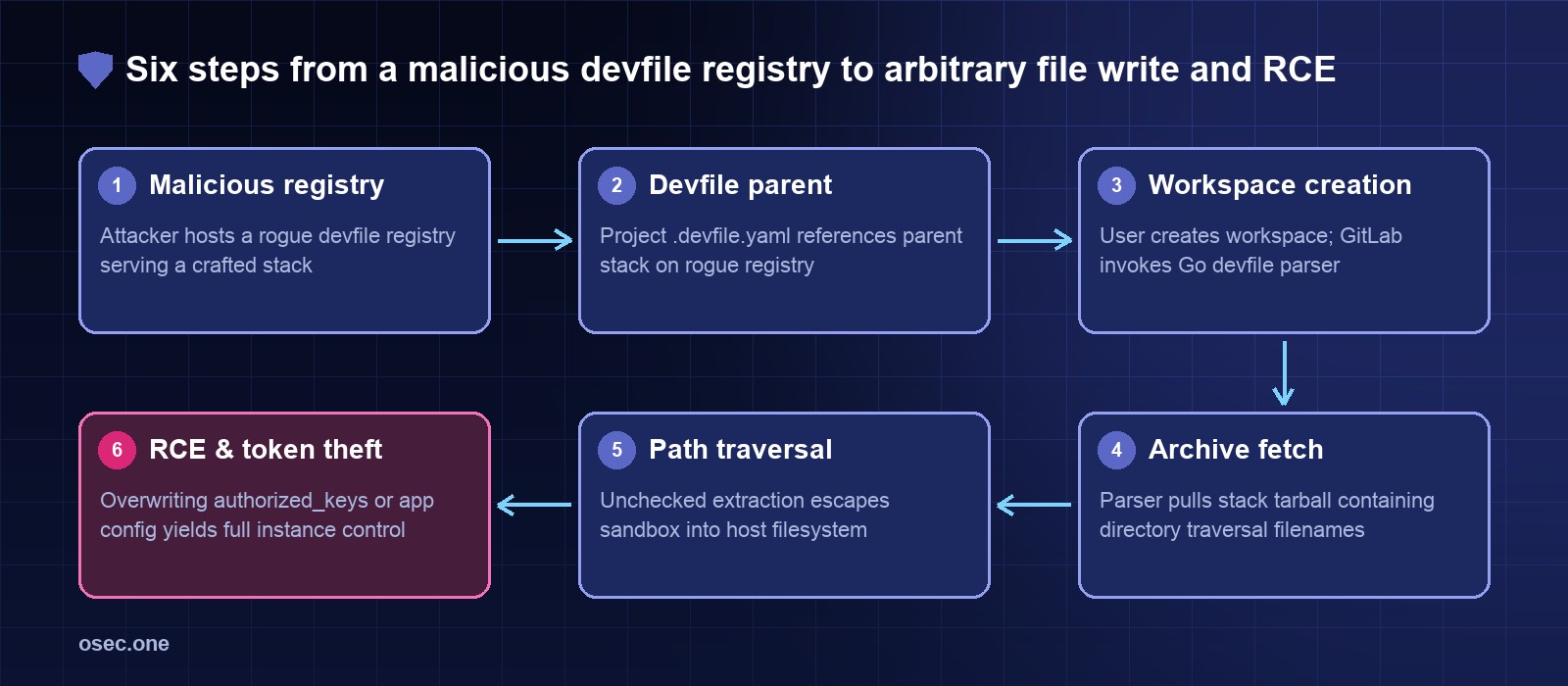
The attack chain of CVE-2024-0402: from a custom Devfile parent registry to directory traversal and host-level shell access.
\n
Vulnerability overview by the numbers
\n
\n
Metric
Details
Impact & context
\n
CVE Identifier
CVE-2024-0402
NVD Common Vulnerabilities and Exposures record
\n
CVSS v3.1 Score
9.9 (Critical)
CVSS:3.1/AV:N/AC:L/PR:L/UI:N/S:C/C:H/I:H/A:H
\n
Vulnerability Class
Path Traversal (CWE-22)
Improper limitation of pathname to restricted directory
\n
Affected Component
GitLab Workspaces / Devfile Parser
Go helper binary invoked by GitLab Rails backend
\n
Affected Versions
16.0 to 16.5.7, 16.6 to 16.6.5, 16.7 to 16.7.3, 16.8.0
All self-managed GitLab CE/EE instances running Workspaces
\n
Fixed Release Versions
16.5.8, 16.6.6, 16.7.4, 16.8.1
Backported security patches released 25 January 2024
\n
Attack Prerequisite
Authenticated account (Low privilege)
Any user with permission to create a workspace in a project
\n
Exploitation Outcome
Arbitrary Host File Write → RCE
Write access as `git` user; shell execution; database token access
\n
\n
To understand how a file write emerged from a developer workspace, one must examine the architecture of cloud-based development environments.
\n
The feature: cloud workspaces and the Devfile standard
\n
Starting in GitLab 16.0 (May 2023), GitLab introduced Remote Development Workspaces. Similar to GitHub Codespaces or Gitpod, GitLab Workspaces let engineers launch on-demand, containerized development environments directly from browser IDEs. Workspaces are configured through an open standard called a Devfile (typically .devfile.yaml in the root of the repository).
\n
A Devfile defines the developer's container tools, environment variables, ports, and parent templates. A typical Devfile references a parent stack configuration: ```yaml schemaVersion: 2.2.0 metadata: name: nodejs-app parent: id: nodejs registryUrl: https://registry.devfile.io ``` When a developer creates a workspace, GitLab parses the .devfile.yaml using an in-house Ruby gem (devfile-gem) that communicates with an external Go-based helper binary (devfile). The parser fetches the parent stack definition from the specified registryUrl, extracts the packaged configuration archive, merges the project configuration with the parent template, and sends the final container manifest to the Kubernetes GitLab Agent (kas).
\n
The root cause: path traversal inside archive extraction
\n
The vulnerability lies in how the Go helper binary processed stack archives fetched from remote Devfile registries. When a parent stack is requested, the registry responds with a compressed tarball or zip archive containing the component specifications.
\n
Security research by firm Doyensec (!exploitable Episode Three: Devfile Adventures) and GitLab's internal notes dissected the extraction mechanics. The unpack routine extracted files into a temporary directory on the GitLab host. However, the extractor failed to perform strict sanitization on the file names contained within the archive header entries:
Attacker configures an arbitrary, attacker-controlled registry URL in `.devfile.yaml`.
\n
2. Template archive download
Download official stack archive (e.g., standard Node.js dev environment).
Attacker's rogue registry serves a crafted tarball containing entries with `../../` relative paths.
\n
3. Archive extraction
Extract files strictly within sandbox `/tmp/devfile-workdir-xxxx/`.
Extraction loop failed to verify target paths stayed within sandbox boundaries.
\n
4. Path resolution
Target path resolved as `SANDBOX_DIR + filename`.
Canonical path escaped the sandbox: e.g., `/tmp/workdir/../../../../var/opt/gitlab/.ssh/authorized_keys`.
\n
5. File write execution
Write configuration files into temporary workspace directory.
Arbitrary file written directly onto the host filesystem under the privileges of the GitLab backend user (`git`).
\n
\n
Because the extraction loop did not enforce destination path confinement (filepath.Clean and prefix boundary validation), archive entries containing path traversal sequences escaped the temporary scratch directory and overwrote files across the host.
\n
From arbitrary file write to full instance takeover
\n
In a standard web application, an arbitrary file write often allows denial-of-service or configuration corruption. On a GitLab Omnibus or self-managed deployment, an arbitrary file write running as the system git user is an immediate bridge to Remote Code Execution (RCE):
\n
• SSH Key Injection (authorized_keys): On Linux GitLab servers, the git user account manages Git-over-SSH repositories. Its SSH authorized keys file sits at /var/opt/gitlab/.ssh/authorized_keys. By crafting a tarball entry targeting ../../../../var/opt/gitlab/.ssh/authorized_keys, an attacker could append their personal SSH public key. Once written, the attacker could connect via SSH (ssh git@gitlab.target.com) and obtain an interactive shell session. • Rails Session Secret Forgery: GitLab stores Rails encryption secrets in /opt/gitlab/embedded/service/gitlab-rails/config/secrets.yml. Overwriting or modifying this file allows an attacker to sign their own arbitrary Rails cookies, instantly impersonating instance administrators. • Webhooks and Executable Script Overwrites: Writing executable hooks into Git server-side custom hooks (custom_hooks/post-receive) executes attacker commands automatically on subsequent git pushes.
\n
The CI/CD blast radius: what attackers steal after host access
\n
Gaining shell access as git on a self-managed GitLab instance exposes the entire software delivery pipeline. The table below details the credentials and assets exposed:
\n
\n
Credential / Asset
Location / Storage
Attacker capability
\n
Repository Source Code
`/var/opt/gitlab/git-data/repositories`
Complete read and write access to all private projects, proprietary code, and commit history.
\n
CI Runner Tokens
GitLab Database (`ci_runners` table)
Register rogue CI runners or hijack existing runners to intercept build jobs across the company.
\n
CI/CD Job Tokens (`CI_JOB_TOKEN`)
Dynamic environment / runner memory
Access cross-project dependencies, package registries, and container images.
\n
Production Secrets & Env Vars
GitLab Database (`ci_variables` encrypted with `db_key_base`)
Once `secrets.yml` is compromised, all CI/CD variables (AWS keys, Kubernetes kubeconfigs, production DB passwords) are decryptable.
\n
Group & Project Deploy Tokens
Database tables
Read and push malicious packages directly to GitLab Package Registry and Container Registry.
\n
\n
An attacker with access to the GitLab server can silently inject malicious code into CI build scripts, publish trojaned container images, or backdoor production application binaries before deployment.
\n
The January 2024 attack wave: chaining vulnerabilities
\n
Although CVE-2024-0402 required an authenticated user account to create a workspace, the attack prerequisite was trivialized by events occurring in the same month:
\n
1. Open User Registration: Thousands of self-managed GitLab servers operate with public user registration enabled by default. Any unauthenticated attacker could register an unprivileged account, create a private project, configure a .devfile.yaml, and trigger the workspace creation exploit. 2. CVE-2023-7028 (Jan 11, 2024): Exactly two weeks prior, GitLab disclosed CVE-2023-7028 (CVSS 10.0), a catastrophic unauthenticated password reset vulnerability where password reset emails could be sent to an attacker-controlled secondary email address. Attackers exploited CVE-2023-7028 to hijack existing user accounts on unpatched instances, providing immediate authenticated access to exploit CVE-2024-0402.
\n
How this compares to other developer infrastructure attacks
\n
Developer tooling and CI/CD platforms have become primary targets for state-sponsored and cybercrime operators. Comparing CVE-2024-0402 with notable developer supply-chain incidents illustrates the threat landscape:
All customer build secrets, cloud API keys, and deployment credentials compromised
\n
\n
Architectural defenses: isolating workspaces and CI/CD pipelines
\n
The lesson from CVE-2024-0402 is clear: complex features like developer workspaces must never be parsed or executed with write access to the host server's root filesystem. Organizations running self-managed or enterprise developer platforms should adopt five structural safeguards:
\n
1. Isolate workspace runtimes to ephemeral Kubernetes pods: Never run workspace provisioning or parsing helpers on the core application server. Workspace provisioning should occur inside restricted Kubernetes namespaces using non-root security contexts (runAsNonRoot: true), read-only root filesystems (readOnlyRootFilesystem: true), and drop: ["ALL"] capabilities. 2. Restrict and allowlist Devfile registries: Block the fetching of parent Devfile stacks from arbitrary public internet URLs. Enforce an internal registry allowlist (e.g. only verified internal mirrors or approved organization registries). 3. Disable public registration and enforce strict auth: Disable open signup on self-managed code platforms. Protect all user accounts with phishing-resistant MFA (passkeys or hardware tokens) to prevent attackers from using compromised credentials to reach workspace features. 4. Audit and pin all CI workflow dependencies: Build pipelines should not pull unversioned actions or remote scripts. Tools like the free osec Action pin lookup allow teams to pin CI actions to immutable commit SHAs in seconds, while the osec Workflow risk check identifies unpinned actions and permission over-scoping. 5. Use short-lived OIDC tokens instead of static cloud secrets: Eliminate long-lived AWS, GCP, or Kubernetes tokens stored in CI/CD environment variables. Transition all automated deployments to OpenID Connect (OIDC) identity federation, ensuring build runners receive temporary, narrowly scoped tokens that expire in minutes.
\n
To verify that your web perimeters, SSL setups, and edge endpoints do not leave open attack surfaces, check your domain with the free osec Site Protection Scan.
\n
Protect your authentication endpoints with osec Auth: passwordless sign-in with email codes, Google, and Apple, eliminating password theft and credential-stuffing risks with zero DNS configuration.
GitLab 2024: CVE-2024-0402 arbitrary file write, account takeover and CI token exposure
On 25 January 2024, GitLab published an urgent critical security release addressing CVE-2024-0402, a flaw carrying a near-maximum CVSS score of 9.9. Discovered internally by GitLab security researcher joernchen, the vulnerability allowed an authenticated user to perform arbitrary file writes across the underlying operating system during the creation of a developer workspace.
Ad
Modern DevOps organizations rely on centralized code repositories not just for source control, but as the execution engine for automated CI/CD builds, release signing, and cloud deployment credentials. When an attacker gains arbitrary file write on a GitLab server, the blast radius does not stop at a damaged file—it immediately expands into root remote code execution (RCE), complete repository exposure, and the theft of CI/CD runner secrets.
The attack chain of CVE-2024-0402: from a custom Devfile parent registry to directory traversal and host-level shell access.
Vulnerability overview by the numbers
Metric
Details
Impact & context
CVE Identifier
CVE-2024-0402
NVD Common Vulnerabilities and Exposures record
CVSS v3.1 Score
9.9 (Critical)
CVSS:3.1/AV:N/AC:L/PR:L/UI:N/S:C/C:H/I:H/A:H
Vulnerability Class
Path Traversal (CWE-22)
Improper limitation of pathname to restricted directory
Affected Component
GitLab Workspaces / Devfile Parser
Go helper binary invoked by GitLab Rails backend
Affected Versions
16.0 to 16.5.7, 16.6 to 16.6.5, 16.7 to 16.7.3, 16.8.0
All self-managed GitLab CE/EE instances running Workspaces
Fixed Release Versions
16.5.8, 16.6.6, 16.7.4, 16.8.1
Backported security patches released 25 January 2024
Attack Prerequisite
Authenticated account (Low privilege)
Any user with permission to create a workspace in a project
Exploitation Outcome
Arbitrary Host File Write → RCE
Write access as `git` user; shell execution; database token access
To understand how a file write emerged from a developer workspace, one must examine the architecture of cloud-based development environments.
The feature: cloud workspaces and the Devfile standard
Starting in GitLab 16.0 (May 2023), GitLab introduced Remote Development Workspaces. Similar to GitHub Codespaces or Gitpod, GitLab Workspaces let engineers launch on-demand, containerized development environments directly from browser IDEs. Workspaces are configured through an open standard called a Devfile (typically .devfile.yaml in the root of the repository).
A Devfile defines the developer's container tools, environment variables, ports, and parent templates. A typical Devfile references a parent stack configuration: ```yaml schemaVersion: 2.2.0 metadata: name: nodejs-app parent: id: nodejs registryUrl: https://registry.devfile.io ``` When a developer creates a workspace, GitLab parses the .devfile.yaml using an in-house Ruby gem (devfile-gem) that communicates with an external Go-based helper binary (devfile). The parser fetches the parent stack definition from the specified registryUrl, extracts the packaged configuration archive, merges the project configuration with the parent template, and sends the final container manifest to the Kubernetes GitLab Agent (kas).
The root cause: path traversal inside archive extraction
The vulnerability lies in how the Go helper binary processed stack archives fetched from remote Devfile registries. When a parent stack is requested, the registry responds with a compressed tarball or zip archive containing the component specifications.
Security research by firm Doyensec (!exploitable Episode Three: Devfile Adventures) and GitLab's internal notes dissected the extraction mechanics. The unpack routine extracted files into a temporary directory on the GitLab host. However, the extractor failed to perform strict sanitization on the file names contained within the archive header entries:
Attacker configures an arbitrary, attacker-controlled registry URL in `.devfile.yaml`.
2. Template archive download
Download official stack archive (e.g., standard Node.js dev environment).
Attacker's rogue registry serves a crafted tarball containing entries with `../../` relative paths.
3. Archive extraction
Extract files strictly within sandbox `/tmp/devfile-workdir-xxxx/`.
Extraction loop failed to verify target paths stayed within sandbox boundaries.
4. Path resolution
Target path resolved as `SANDBOX_DIR + filename`.
Canonical path escaped the sandbox: e.g., `/tmp/workdir/../../../../var/opt/gitlab/.ssh/authorized_keys`.
5. File write execution
Write configuration files into temporary workspace directory.
Arbitrary file written directly onto the host filesystem under the privileges of the GitLab backend user (`git`).
Because the extraction loop did not enforce destination path confinement (filepath.Clean and prefix boundary validation), archive entries containing path traversal sequences escaped the temporary scratch directory and overwrote files across the host.
From arbitrary file write to full instance takeover
In a standard web application, an arbitrary file write often allows denial-of-service or configuration corruption. On a GitLab Omnibus or self-managed deployment, an arbitrary file write running as the system git user is an immediate bridge to Remote Code Execution (RCE):
• SSH Key Injection (authorized_keys): On Linux GitLab servers, the git user account manages Git-over-SSH repositories. Its SSH authorized keys file sits at /var/opt/gitlab/.ssh/authorized_keys. By crafting a tarball entry targeting ../../../../var/opt/gitlab/.ssh/authorized_keys, an attacker could append their personal SSH public key. Once written, the attacker could connect via SSH (ssh git@gitlab.target.com) and obtain an interactive shell session. • Rails Session Secret Forgery: GitLab stores Rails encryption secrets in /opt/gitlab/embedded/service/gitlab-rails/config/secrets.yml. Overwriting or modifying this file allows an attacker to sign their own arbitrary Rails cookies, instantly impersonating instance administrators. • Webhooks and Executable Script Overwrites: Writing executable hooks into Git server-side custom hooks (custom_hooks/post-receive) executes attacker commands automatically on subsequent git pushes.
The CI/CD blast radius: what attackers steal after host access
Gaining shell access as git on a self-managed GitLab instance exposes the entire software delivery pipeline. The table below details the credentials and assets exposed:
Credential / Asset
Location / Storage
Attacker capability
Repository Source Code
`/var/opt/gitlab/git-data/repositories`
Complete read and write access to all private projects, proprietary code, and commit history.
CI Runner Tokens
GitLab Database (`ci_runners` table)
Register rogue CI runners or hijack existing runners to intercept build jobs across the company.
CI/CD Job Tokens (`CI_JOB_TOKEN`)
Dynamic environment / runner memory
Access cross-project dependencies, package registries, and container images.
Production Secrets & Env Vars
GitLab Database (`ci_variables` encrypted with `db_key_base`)
Once `secrets.yml` is compromised, all CI/CD variables (AWS keys, Kubernetes kubeconfigs, production DB passwords) are decryptable.
Group & Project Deploy Tokens
Database tables
Read and push malicious packages directly to GitLab Package Registry and Container Registry.
An attacker with access to the GitLab server can silently inject malicious code into CI build scripts, publish trojaned container images, or backdoor production application binaries before deployment.
The January 2024 attack wave: chaining vulnerabilities
Although CVE-2024-0402 required an authenticated user account to create a workspace, the attack prerequisite was trivialized by events occurring in the same month:
1. Open User Registration: Thousands of self-managed GitLab servers operate with public user registration enabled by default. Any unauthenticated attacker could register an unprivileged account, create a private project, configure a .devfile.yaml, and trigger the workspace creation exploit. 2. CVE-2023-7028 (Jan 11, 2024): Exactly two weeks prior, GitLab disclosed CVE-2023-7028 (CVSS 10.0), a catastrophic unauthenticated password reset vulnerability where password reset emails could be sent to an attacker-controlled secondary email address. Attackers exploited CVE-2023-7028 to hijack existing user accounts on unpatched instances, providing immediate authenticated access to exploit CVE-2024-0402.
How this compares to other developer infrastructure attacks
Developer tooling and CI/CD platforms have become primary targets for state-sponsored and cybercrime operators. Comparing CVE-2024-0402 with notable developer supply-chain incidents illustrates the threat landscape:
All customer build secrets, cloud API keys, and deployment credentials compromised
Architectural defenses: isolating workspaces and CI/CD pipelines
The lesson from CVE-2024-0402 is clear: complex features like developer workspaces must never be parsed or executed with write access to the host server's root filesystem. Organizations running self-managed or enterprise developer platforms should adopt five structural safeguards:
1. Isolate workspace runtimes to ephemeral Kubernetes pods: Never run workspace provisioning or parsing helpers on the core application server. Workspace provisioning should occur inside restricted Kubernetes namespaces using non-root security contexts (runAsNonRoot: true), read-only root filesystems (readOnlyRootFilesystem: true), and drop: ["ALL"] capabilities. 2. Restrict and allowlist Devfile registries: Block the fetching of parent Devfile stacks from arbitrary public internet URLs. Enforce an internal registry allowlist (e.g. only verified internal mirrors or approved organization registries). 3. Disable public registration and enforce strict auth: Disable open signup on self-managed code platforms. Protect all user accounts with phishing-resistant MFA (passkeys or hardware tokens) to prevent attackers from using compromised credentials to reach workspace features. 4. Audit and pin all CI workflow dependencies: Build pipelines should not pull unversioned actions or remote scripts. Tools like the free osec Action pin lookup allow teams to pin CI actions to immutable commit SHAs in seconds, while the osec Workflow risk check identifies unpinned actions and permission over-scoping. 5. Use short-lived OIDC tokens instead of static cloud secrets: Eliminate long-lived AWS, GCP, or Kubernetes tokens stored in CI/CD environment variables. Transition all automated deployments to OpenID Connect (OIDC) identity federation, ensuring build runners receive temporary, narrowly scoped tokens that expire in minutes.
To verify that your web perimeters, SSL setups, and edge endpoints do not leave open attack surfaces, check your domain with the free osec Site Protection Scan.
Protect your authentication endpoints with osec Auth: passwordless sign-in with email codes, Google, and Apple, eliminating password theft and credential-stuffing risks with zero DNS configuration.