A lint config is a strange place for malware, and that is the point. It never ships to production, so nobody thinks of it as attack surface, yet it runs on developer laptops and build machines, where the npm tokens and browser sessions live. This write-up gives the timeline from the npm registry's own timestamps, the dependency paths that brought these packages into projects that never chose them, and our own test of which package manager settings would stop the same attack today. It differs from our chalk and debug case from seven weeks later: that one was a browser clipper in shipped bundles, this one attacks the machine that runs the install.
The registry keeps the publish time of a removed version, so the timeline can be read directly even though the files are gone. We read these on 5 November 2026. All eight tarballs we tried for these versions now return 404. Downloads are npm's own count for the last full week before the attack, 11-17 July 2025.
"},{"id":145961,"block_type":"html","html":"
Package
Bad version
Published (18 Jul, UTC)
First clean on that line
Gap
Downloads, 11-17 Jul
eslint-config-prettier
9.1.1
15:51:53
9.1.2 at 19:19:03
3 h 27 m
31,422,278
eslint-config-prettier
8.10.1
16:09:40
8.10.2 at 19:17:46
3 h 08 m
(same package)
eslint-config-prettier
10.1.6, 10.1.7
16:12:58, 16:13:43
10.1.8 at 18:40:08
2 h 27 m
(same package)
eslint-plugin-prettier
4.2.2, 4.2.3
16:23:06, 16:23:49
4.2.4 at 19:32:10
3 h 09 m
21,651,329
synckit
0.11.9
16:27:27
0.11.10 at 19:02:43
2 h 35 m
18,077,253
@pkgr/core
0.2.8
16:34:28
0.2.9 at 18:51:58
2 h 17 m
16,087,314
napi-postinstall
0.3.1
16:36:55
0.3.2 at 18:55:34
2 h 18 m
9,879,285
"},{"id":145962,"block_type":"paragraph","html":"
What that means in downloads. The five packages total 97,117,459 downloads a week. If each week were spread evenly over 168 hours, the download count during each package's longest gap comes to about 1.69 million (for example 31,422,278 / 168 x 3.45 hours = about 646,000 for eslint-config-prettier). Treat that as a ceiling on installs that could have pulled a bad version, not as a victim count: most of those downloads read a lockfile or an older version, only Windows machines ran the DLL, and the same project can count several times because these packages depend on each other. No source we found counts infected machines.
"},{"id":145963,"block_type":"paragraph","html":"
The 10.1.6 dispute. The CVE and GitHub's advisory list 10.1.6. JFrog looked inside it and says it has a changed package.json but no install script or DLL, so it was safe. With the tarball gone we could not check, and the safe reading for your own audit is to treat it as bad. The registry shows 10.1.6 and 10.1.7 only 45 seconds apart.
Three of the five packages are helpers few people install on purpose. We read these dependency ranges from the registry for the versions current just before the attack. Each range accepts the bad version, so any install that resolved fresh could pick it up, with no change to your package.json.
"},{"id":145966,"block_type":"html","html":"
You installed
Which asks for
Which asks for
Bad version accepted
eslint-plugin-prettier 5.5.1
synckit ^0.11.7
@pkgr/core ^0.2.4
synckit 0.11.9, @pkgr/core 0.2.8
jest-resolve 30.0.2 (Jest 30)
unrs-resolver ^1.7.11
napi-postinstall ^0.3.0
napi-postinstall 0.3.1
eslint-import-resolver-typescript 4.4.4
unrs-resolver ^1.7.11
napi-postinstall ^0.3.0
napi-postinstall 0.3.1
eslint-plugin-import-x 4.16.1
unrs-resolver ^1.9.2
napi-postinstall ^0.3.0
napi-postinstall 0.3.1
"},{"id":145967,"block_type":"paragraph","html":"
The unrs-resolver ranges resolved to 1.11.1 at the time. The issue thread shows a path like this in real life: at 22:54 UTC a developer installing a Nuxt project reported an antivirus hit on node-gyp from napi-postinstall. Update bots spread it too: StepSecurity notes Dependabot and Renovate pull requests for the new versions were merged in several repositories.
The lure was a plain account-verification request. It was built to survive a quick look: 1. Sender. The From line showed support@npmjs.com, the real address, spoofed. BleepingComputer and the thread agree on this, and an analysis quoted in the thread says SPF, DKIM and DMARC all failed. 2. Link. It went to npnjs.com, a full copy of the npm site. SecurityWeek reports tokenized URLs that could track clicks and fill in the victim's details, plus support links pointing at the real npmjs.com. 3. Targeting. Addresses were likely taken from package metadata, according to DeceptIQ via SecurityWeek.
"},{"id":145970,"block_type":"paragraph","html":"
If the checks failed, why did the mail arrive? A receiver acts on the domain owner's policy, and the record reads p=quarantine; pct=5, as quoted in the thread in July 2025. It still read the same on 5 November 2026, when we looked it up:
pct=5 asks receivers to apply the quarantine policy to 5% of failing mail. Under RFC 7489 the other 95% gets the next lower policy, which here is none. Receivers can still filter on their own signals. We can't say this record is why this email landed, since we found no published copy of its full headers. We ran npmjs.com through our free email security check: it grades A at 90 points, with this warning: "pct=5: only part of the failing mail is acted on". A good grade can still hide the one line a spoofer needs, so read the warnings on your own domain too.
The maintainer's own account on X, as quoted by StepSecurity: "I was tricked by a phishing email and a new npm token was added and leaked." Malpedia's summary says the victim was tricked into creating a long-lived automation token. SecurityWeek reports that the attackers likely abused npm's login flow to get tokens that don't expire, and that developers weren't told when a token was requested from another machine. The sources we read don't show exactly what the clone page did or how 2FA was handled, so we won't guess.
"},{"id":145975,"block_type":"paragraph","html":"
A token changes what the attacker can do next. It works from anywhere, needs no further prompt, and in this case published nine versions under the maintainer's real name: a commenter in the thread pointed out that the published-by user on the bad versions was JounQin. The account looked right, and the outside signals were no GitHub commits and no provenance.
The change to the package was small. In 9.1.1, SafeDep reports the only package.json edit was adding "install": "node install.js". The package gained two files, a roughly 5.8 KB install.js and a roughly 1.29 MB node-gyp.dll. A package that exports a list of ESLint rules has no obvious need for either, which is why readers of the diff spotted it quickly.
- The name.node-gyp is a real tool that shows up in install logs all the time, so the DLL's name looks routine at a glance. - The function. The call sits in logDiskSpace(), among log-rotation helpers the script never calls. - The strings. Names are split up ('rund' + 'll32', 'chi' + 'ld_pro' + 'cess'), which beats a plain text search but not a person reading it. - The platform check. It acts only when os.platform() is win32, so Linux CI and macOS laptops never ran the DLL.
Invoke RE's post of 20 July is the fullest analysis we read. Utkonos's parallel write-up credits the name to one researcher's reading of a PDB path. In short:
"},{"id":145980,"block_type":"html","html":"
Stage
What it does
What it gives a defender
Environment checks
Reads SMBIOS firmware for VMware and QEMU strings, looks for loaded DLLs of Avast, Qihoo 360, Sandboxie, Comodo and others, checks for hooks, and requires more than 3 processors. A failed check crashes it on purpose
A crash in rundll32.exe during an npm install may be the only trace
Hiding
Resolves Windows functions by CRC32 hash, makes some system calls indirectly, decrypts strings at run time
Plain string scans of the DLL find little
Marker
Uses %TEMP%\\SCVNGR_VM, checked for prior infection
A simple file check
Command channel
Talks HTTPS through libcurl with XXTEA-encrypted data, moving to the next domain in its list if one fails, then downloads modules
Invoke RE links an IOC list on GitHub; block and search for those domains
npm tokens
Reads the user's .npmrc and sends it out
Rotate npm tokens on any affected machine
Modules
Placed for DLL side-loading: version.dll next to notification_helper.exe, umpdc.dll for Electrum, profapi.dll for Exodus. Second-stage strings point at Chromium extensions, service worker cache and visited links
Look for those DLL names beside browser and wallet programs
"},{"id":145981,"block_type":"paragraph","html":"
Two points stand out. The .npmrc read means the malware collects the same thing the phishing page collected, so each victim can become the next source of publish rights. And the processor check has an odd effect on CI: GitHub's docs, read today, give standard hosted Windows runners 4 CPUs on public repositories and 2 on private ones. A 2-CPU runner should fail the "more than 3" test and crash the loader. That is our inference from the two documents and we did not test it, so don't treat a small runner as safe.
"},{"id":145982,"block_type":"paragraph","html":"
Known gaps: Invoke RE planned further analysis of the modules, and we found no full list of what each one takes. Sources also differ on emphasis: Malpedia and SecurityWeek describe Chromium data theft, while Invoke RE's first post names Exodus and Electrum paths. Attribution is unknown. Malpedia links the family to a tampered game binary and, in a report dated 28 July 2025, to the num2words package on PyPI.
We can't and wouldn't install the real packages, so we rebuilt the situation. A throwaway registry on 127.0.0.1 served a demo package with a clean 1.0.0, 30 days old, and a 1.0.1 whose install script only writes a marker file. The project asked for ^1.0.0, the same range shape real projects used. We stamped 1.0.1 first as 1 hour old, then as 30 hours old, because a bad version might stay up longer than a default wait. Every run started with an empty cache and home folder on a Mac with Node 22.23.4.
"},{"id":145987,"block_type":"html","html":"
Package manager
Plain install, 1 hour old
Plain install, 30 hours old
Frozen lockfile on 1.0.0
Ignore-scripts option, 30 hours old
3-day cooldown set, 1 hour old
npm 10.9.10
script ran
script ran
stayed on 1.0.0
installed, no script
script ran (setting has no effect, no warning)
npm 11.21.2
script ran, with a warning
script ran, with a warning
stayed on 1.0.0
installed, no script
stayed on 1.0.0
npm 12.2.2
installed, script blocked
installed, script blocked
stayed on 1.0.0
installed, no script
stayed on 1.0.0
pnpm 10.34.9
installed, script ignored
installed, script ignored
stayed on 1.0.0
installed, no script
stayed on 1.0.0
pnpm 12.16.1
stayed on 1.0.0 (default wait)
script not run, install fails with ERR_PNPM_IGNORED_BUILDS
stayed on 1.0.0
installed, no script
stayed on 1.0.0
Yarn 4.18.1
stayed on 1.0.0 (default wait)
installed, scripts disabled
stayed on 1.0.0
installed, no script (--mode=skip-build)
stayed on 1.0.0
Bun 1.4.4
installed, script blocked
installed, script blocked
stayed on 1.0.0
installed, no script
stayed on 1.0.0
"},{"id":145988,"block_type":"paragraph","html":"
What we take from it: - The npm that ships with your Node may still run scripts. The Node 22 install on our machine bundles npm 10.9.9, and 10.9.10, the 10.x we tested, ran the script. min-release-age=3 in .npmrc was accepted without a word and did nothing, even though npm config get printed it back. If you copied that setting, check your npm version. - npm 11 warns and runs anyway. The warning names the package, but the script still runs. - Blocking a script doesn't remove the package. In every "blocked" cell, 1.0.1 was still in node_modules. That stops this attack, but a payload in the module's own code, as with chalk, would still load when imported. - A failing install is the louder signal. pnpm 12 was the only one that stopped with an error instead of a line in the log. - Yarn's docs and behaviour differ. The docs page we read gives a one-week default for npmMinimalAgeGate. Version 4.18.1 has 1d in its code and picked up the 30-hour version, so set the value yourself. - Dependencies of dependencies behave the same. We repeated the 1-hour test through a middle package, and all seven gave the same result as the direct install.
Limits: one machine, macOS, a local registry with dates we set, and a marker file instead of a payload. It tests the package managers' behaviour on the versions listed, not the original malware. On timing, clean releases came within about 3.5 hours here, so even a 1-day wait would have held these versions back. Our 3-day cooldown review checks this case against the others.
Don't follow login links from mail, type npmjs.com. A password manager that refuses to autofill means stop. On your own domains, set DMARC with pct at 100 or left out
Maintainers, domain owners
Credentials
Use a passkey or security key on npm: it signs for npmjs.com only, so a clone at npnjs.com gets nothing to replay. Check your token list after any odd login
Maintainers
Token
Publish through trusted publishing (OIDC). npm revoked all classic tokens on 9 Dec 2025 and limits write tokens to 90 days, which shrinks the window. See npm 12 and the 2026 GitHub Actions hardening
Maintainers
Publish
Treat a new release with no matching tag or provenance as suspect. Provenance alone isn't enough: 10.1.4, 10.1.5 and 10.1.8 have it, but the clean 8.10.2 and 9.1.2 don't
Consumers, bots
Resolve
Frozen lockfile in CI (npm ci, pnpm install --frozen-lockfile). A cooldown in the update bot and in the package manager
Consumers
Install
npm 12 or pnpm with the default script block, and an allowlist committed in the repo. On older npm, set ignore-scripts=true and allow exceptions by hand
Consumers
Stage 2
No long-lived publish token in .npmrc on a developer machine. Alert on node.exe starting rundll32.exe. Outbound allowlists on build machines
1. Look for the versions in your lockfile. For package-lock.json (v2 or v3), save this as check.js and run node check.js. It finds nested copies too, and it exits 1 on a hit so it can go in CI. We ran it and the pnpm search below on sample lockfiles.
"},{"id":145993,"block_type":"code","html":"
javascript
const bad = { "eslint-config-prettier": ["8.10.1", "9.1.1", "10.1.6", "10.1.7"], "eslint-plugin-prettier": ["4.2.2", "4.2.3"],\n "synckit": ["0.11.9"], "@pkgr/core": ["0.2.8"], "napi-postinstall": ["0.3.1"], "got-fetch": ["5.1.11", "5.1.12"], "is": ["3.3.1", "5.0.0"] };\nconst lock = JSON.parse(require("fs").readFileSync(process.argv[2] || "package-lock.json", "utf8"));\nlet hits = 0;\nfor (const [path, pkg] of Object.entries(lock.packages || {})) {\n const name = path.split("node_modules/").pop();\n if (bad[name]?.includes(pkg.version)) { console.log("HIT", path, pkg.version); hits++; }\n}\nconsole.log(hits ? `${hits} bad version(s)` : "none of the listed versions");\nprocess.exit(hits ? 1 : 0);
3. For Yarn, run yarn why synckit and the same for the others. 4. Check history, not just today's file: run the same search over old lockfiles in git, and list Windows builds from 18-21 July 2025 that resolved dependencies fresh. 5. On any Windows machine that may have installed one, look for the folder with Test-Path "$env:TEMP\\SCVNGR_VM" in PowerShell, and for node-gyp.dll, whose reported SHA-256 is c68e42f416f482d43653f36cd14384270b54b68d6496a8e34ce887687de5b441. We had no Windows machine in this test, so that line and the hash come from the sources, unverified by us. A clean result doesn't clear a machine, since the marker sits in a temp folder that gets emptied. 6. If you find a hit, treat the machine as compromised: rebuild it, rotate npm tokens first, then browser sessions and saved passwords, and move any wallet funds using a clean device.
"},{"id":145997,"block_type":"cta","html":"
The sender on this phish was spoofed. See whether your own domain's SPF and DMARC would let the same happen, free and without signing in.
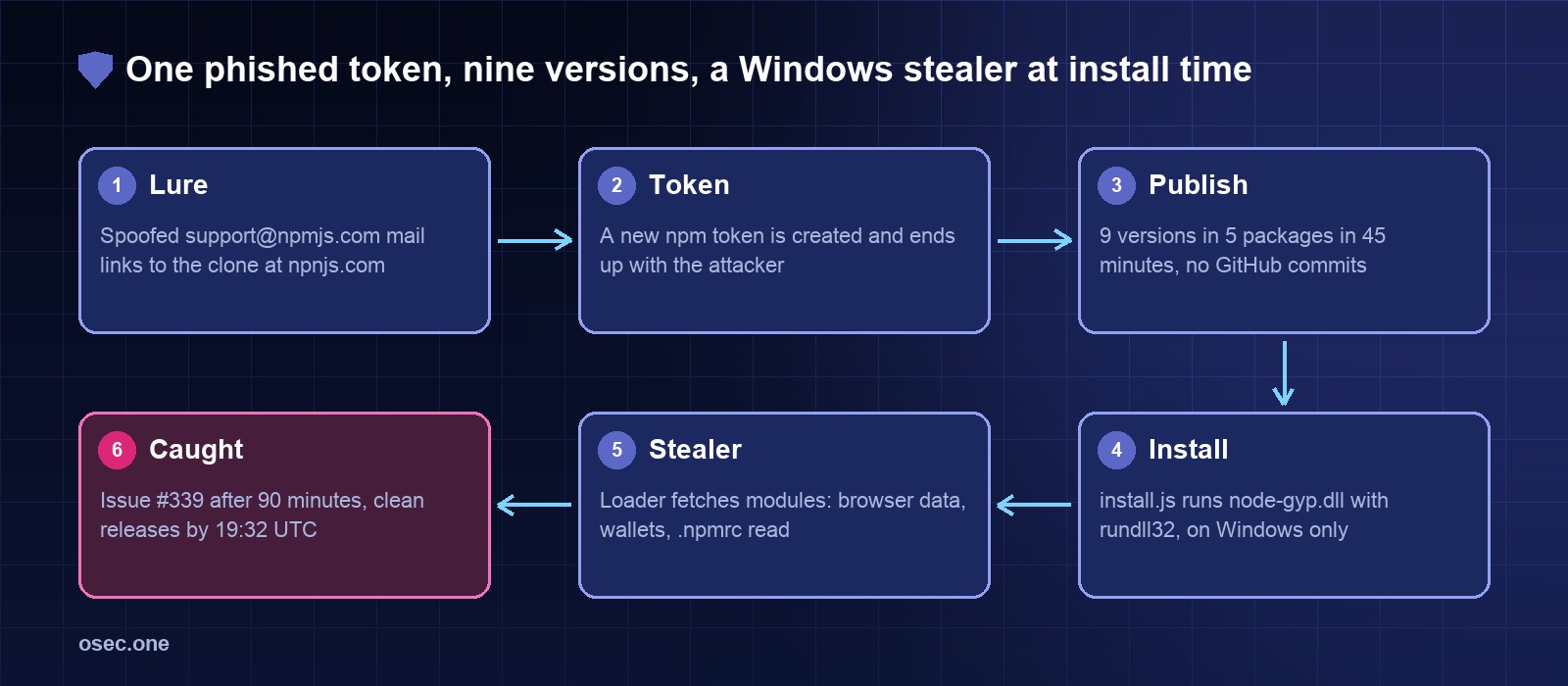
On Friday 18 July 2025 a maintainer of eslint-config-prettier clicked a "verify your account" email that appeared to come from support@npmjs.com. The link went to npnjs.com, one letter away from the real domain. Within hours, npm carried nine new versions across five packages with about 97 million downloads a week between them, published with a stolen token and with no matching commits on GitHub. On Windows, installing one ran a DLL through rundll32. The DLL was a loader for an infostealer that researchers named Scavenger.
\n
Ad
\n
A lint config is a strange place for malware, and that is the point. It never ships to production, so nobody thinks of it as attack surface, yet it runs on developer laptops and build machines, where the npm tokens and browser sessions live. This write-up gives the timeline from the npm registry's own timestamps, the dependency paths that brought these packages into projects that never chose them, and our own test of which package manager settings would stop the same attack today. It differs from our chalk and debug case from seven weeks later: that one was a browser clipper in shipped bundles, this one attacks the machine that runs the install.
\n
\n
What happened, dated (UTC)
\n
When
Event
Source
17 Jul, 17:28 and 17:58
got-fetch 5.1.11 and 5.1.12 published, a different maintainer who reportedly got the same email. That is 22 hours before the Prettier packages
npm registry; StepSecurity
18 Jul, 08:59:38
Compile timestamp inside node-gyp.dll, if the timestamp is honest and in UTC
Invoke RE
18 Jul, 15:51:53
First bad release: eslint-config-prettier 9.1.1
npm registry
18 Jul, 16:36:55
Ninth and last: napi-postinstall 0.3.1, 45 minutes after the first
npm registry
18 Jul, 17:22:08
User dasa opens issue #339: \"four new versions published with no code changes to repo\". That is 90 minutes after the first release
GitHub
18 Jul, 17:41
A commenter reads Renovate's diff: new install script, new .dll, a rundll32 call
GitHub
18 Jul, 18:00
Same commenter: earlier releases carry npm provenance, these do not
GitHub
18 Jul, 18:23
Maintainer JounQin finds the phishing email, deletes the token
GitHub
18 Jul, 18:40 to 19:32
Clean releases on every affected line
npm registry
19 Jul, 11:40 and 18:36
is 3.3.1 and 5.0.0 published, with a different, cross-platform loader. Clean 3.3.2 at 19:13
npm registry; heise
19 Jul, 17:15
CVE-2025-54313 published (CVSS 7.5, CWE-506)
NVD
21 Jul, by 03:04
A commenter sees npm has removed the versions, except eslint-plugin-prettier's at that moment
GitHub
22 Jan 2026
CISA adds the CVE to its Known Exploited Vulnerabilities list, due 12 Feb 2026
CISA KEV
\n
Nine versions in 45 minutes
\n
The registry keeps the publish time of a removed version, so the timeline can be read directly even though the files are gone. We read these on 5 November 2026. All eight tarballs we tried for these versions now return 404. Downloads are npm's own count for the last full week before the attack, 11-17 July 2025.
\n
Package
Bad version
Published (18 Jul, UTC)
First clean on that line
Gap
Downloads, 11-17 Jul
eslint-config-prettier
9.1.1
15:51:53
9.1.2 at 19:19:03
3 h 27 m
31,422,278
eslint-config-prettier
8.10.1
16:09:40
8.10.2 at 19:17:46
3 h 08 m
(same package)
eslint-config-prettier
10.1.6, 10.1.7
16:12:58, 16:13:43
10.1.8 at 18:40:08
2 h 27 m
(same package)
eslint-plugin-prettier
4.2.2, 4.2.3
16:23:06, 16:23:49
4.2.4 at 19:32:10
3 h 09 m
21,651,329
synckit
0.11.9
16:27:27
0.11.10 at 19:02:43
2 h 35 m
18,077,253
@pkgr/core
0.2.8
16:34:28
0.2.9 at 18:51:58
2 h 17 m
16,087,314
napi-postinstall
0.3.1
16:36:55
0.3.2 at 18:55:34
2 h 18 m
9,879,285
\n
What that means in downloads. The five packages total 97,117,459 downloads a week. If each week were spread evenly over 168 hours, the download count during each package's longest gap comes to about 1.69 million (for example 31,422,278 / 168 x 3.45 hours = about 646,000 for eslint-config-prettier). Treat that as a ceiling on installs that could have pulled a bad version, not as a victim count: most of those downloads read a lockfile or an older version, only Windows machines ran the DLL, and the same project can count several times because these packages depend on each other. No source we found counts infected machines.
\n
The 10.1.6 dispute. The CVE and GitHub's advisory list 10.1.6. JFrog looked inside it and says it has a changed package.json but no install script or DLL, so it was safe. With the tarball gone we could not check, and the safe reading for your own audit is to treat it as bad. The registry shows 10.1.6 and 10.1.7 only 45 seconds apart.
\n
How a project with no Prettier got it
\n
Three of the five packages are helpers few people install on purpose. We read these dependency ranges from the registry for the versions current just before the attack. Each range accepts the bad version, so any install that resolved fresh could pick it up, with no change to your package.json.
\n
You installed
Which asks for
Which asks for
Bad version accepted
eslint-plugin-prettier 5.5.1
synckit ^0.11.7
@pkgr/core ^0.2.4
synckit 0.11.9, @pkgr/core 0.2.8
jest-resolve 30.0.2 (Jest 30)
unrs-resolver ^1.7.11
napi-postinstall ^0.3.0
napi-postinstall 0.3.1
eslint-import-resolver-typescript 4.4.4
unrs-resolver ^1.7.11
napi-postinstall ^0.3.0
napi-postinstall 0.3.1
eslint-plugin-import-x 4.16.1
unrs-resolver ^1.9.2
napi-postinstall ^0.3.0
napi-postinstall 0.3.1
\n
The unrs-resolver ranges resolved to 1.11.1 at the time. The issue thread shows a path like this in real life: at 22:54 UTC a developer installing a Nuxt project reported an antivirus hit on node-gyp from napi-postinstall. Update bots spread it too: StepSecurity notes Dependabot and Renovate pull requests for the new versions were merged in several repositories.
\n
Step 1: the email and the one-letter domain
\n
The lure was a plain account-verification request. It was built to survive a quick look: 1. Sender. The From line showed support@npmjs.com, the real address, spoofed. BleepingComputer and the thread agree on this, and an analysis quoted in the thread says SPF, DKIM and DMARC all failed. 2. Link. It went to npnjs.com, a full copy of the npm site. SecurityWeek reports tokenized URLs that could track clicks and fill in the victim's details, plus support links pointing at the real npmjs.com. 3. Targeting. Addresses were likely taken from package metadata, according to DeceptIQ via SecurityWeek.
\n
If the checks failed, why did the mail arrive? A receiver acts on the domain owner's policy, and the record reads p=quarantine; pct=5, as quoted in the thread in July 2025. It still read the same on 5 November 2026, when we looked it up:
pct=5 asks receivers to apply the quarantine policy to 5% of failing mail. Under RFC 7489 the other 95% gets the next lower policy, which here is none. Receivers can still filter on their own signals. We can't say this record is why this email landed, since we found no published copy of its full headers. We ran npmjs.com through our free email security check: it grades A at 90 points, with this warning: "pct=5: only part of the failing mail is acted on". A good grade can still hide the one line a spoofer needs, so read the warnings on your own domain too.
\n
Step 2: a token, not just a login
\n
The maintainer's own account on X, as quoted by StepSecurity: "I was tricked by a phishing email and a new npm token was added and leaked." Malpedia's summary says the victim was tricked into creating a long-lived automation token. SecurityWeek reports that the attackers likely abused npm's login flow to get tokens that don't expire, and that developers weren't told when a token was requested from another machine. The sources we read don't show exactly what the clone page did or how 2FA was handled, so we won't guess.
\n
A token changes what the attacker can do next. It works from anywhere, needs no further prompt, and in this case published nine versions under the maintainer's real name: a commenter in the thread pointed out that the published-by user on the bad versions was JounQin. The account looked right, and the outside signals were no GitHub commits and no provenance.
\n
Step 3: an install script in a config package
\n
The change to the package was small. In 9.1.1, SafeDep reports the only package.json edit was adding "install": "node install.js". The package gained two files, a roughly 5.8 KB install.js and a roughly 1.29 MB node-gyp.dll. A package that exports a list of ESLint rules has no obvious need for either, which is why readers of the diff spotted it quickly.
- The name.node-gyp is a real tool that shows up in install logs all the time, so the DLL's name looks routine at a glance. - The function. The call sits in logDiskSpace(), among log-rotation helpers the script never calls. - The strings. Names are split up ('rund' + 'll32', 'chi' + 'ld_pro' + 'cess'), which beats a plain text search but not a person reading it. - The platform check. It acts only when os.platform() is win32, so Linux CI and macOS laptops never ran the DLL.
\n
Step 4: what Scavenger did on the machine
\n
Invoke RE's post of 20 July is the fullest analysis we read. Utkonos's parallel write-up credits the name to one researcher's reading of a PDB path. In short:
\n
Stage
What it does
What it gives a defender
Environment checks
Reads SMBIOS firmware for VMware and QEMU strings, looks for loaded DLLs of Avast, Qihoo 360, Sandboxie, Comodo and others, checks for hooks, and requires more than 3 processors. A failed check crashes it on purpose
A crash in rundll32.exe during an npm install may be the only trace
Hiding
Resolves Windows functions by CRC32 hash, makes some system calls indirectly, decrypts strings at run time
Plain string scans of the DLL find little
Marker
Uses %TEMP%\\SCVNGR_VM, checked for prior infection
A simple file check
Command channel
Talks HTTPS through libcurl with XXTEA-encrypted data, moving to the next domain in its list if one fails, then downloads modules
Invoke RE links an IOC list on GitHub; block and search for those domains
npm tokens
Reads the user's .npmrc and sends it out
Rotate npm tokens on any affected machine
Modules
Placed for DLL side-loading: version.dll next to notification_helper.exe, umpdc.dll for Electrum, profapi.dll for Exodus. Second-stage strings point at Chromium extensions, service worker cache and visited links
Look for those DLL names beside browser and wallet programs
\n
Two points stand out. The .npmrc read means the malware collects the same thing the phishing page collected, so each victim can become the next source of publish rights. And the processor check has an odd effect on CI: GitHub's docs, read today, give standard hosted Windows runners 4 CPUs on public repositories and 2 on private ones. A 2-CPU runner should fail the "more than 3" test and crash the loader. That is our inference from the two documents and we did not test it, so don't treat a small runner as safe.
\n
Known gaps: Invoke RE planned further analysis of the modules, and we found no full list of what each one takes. Sources also differ on emphasis: Malpedia and SecurityWeek describe Chromium data theft, while Invoke RE's first post names Exodus and Electrum paths. Attribution is unknown. Malpedia links the family to a tampered game binary and, in a report dated 28 July 2025, to the num2words package on PyPI.
\n
How this differs from chalk and debug
\n
eslint-config-prettier, Jul 2025
chalk and debug, Sep 2025
Lookalike domain
npnjs.com
npmjs.help
Sender shown
support@npmjs.com (spoofed)
support@npmjs.help
What was taken
An npm token
A login session, with a relayed TOTP code
When the code runs
At install
In a browser, from the shipped bundle
Who is the victim
Developers and build machines on Windows
End users paying in crypto
Goal
Tokens, browser data, wallets on the machine
Swap payee addresses
Install-script controls help?
Yes, they stop the first step
No, there was no install script
Known loss
No public figure we found
About $500
\n
We tested which settings stop this today
\n
We can't and wouldn't install the real packages, so we rebuilt the situation. A throwaway registry on 127.0.0.1 served a demo package with a clean 1.0.0, 30 days old, and a 1.0.1 whose install script only writes a marker file. The project asked for ^1.0.0, the same range shape real projects used. We stamped 1.0.1 first as 1 hour old, then as 30 hours old, because a bad version might stay up longer than a default wait. Every run started with an empty cache and home folder on a Mac with Node 22.23.4.
\n
Package manager
Plain install, 1 hour old
Plain install, 30 hours old
Frozen lockfile on 1.0.0
Ignore-scripts option, 30 hours old
3-day cooldown set, 1 hour old
npm 10.9.10
script ran
script ran
stayed on 1.0.0
installed, no script
script ran (setting has no effect, no warning)
npm 11.21.2
script ran, with a warning
script ran, with a warning
stayed on 1.0.0
installed, no script
stayed on 1.0.0
npm 12.2.2
installed, script blocked
installed, script blocked
stayed on 1.0.0
installed, no script
stayed on 1.0.0
pnpm 10.34.9
installed, script ignored
installed, script ignored
stayed on 1.0.0
installed, no script
stayed on 1.0.0
pnpm 12.16.1
stayed on 1.0.0 (default wait)
script not run, install fails with ERR_PNPM_IGNORED_BUILDS
stayed on 1.0.0
installed, no script
stayed on 1.0.0
Yarn 4.18.1
stayed on 1.0.0 (default wait)
installed, scripts disabled
stayed on 1.0.0
installed, no script (--mode=skip-build)
stayed on 1.0.0
Bun 1.4.4
installed, script blocked
installed, script blocked
stayed on 1.0.0
installed, no script
stayed on 1.0.0
\n
What we take from it: - The npm that ships with your Node may still run scripts. The Node 22 install on our machine bundles npm 10.9.9, and 10.9.10, the 10.x we tested, ran the script. min-release-age=3 in .npmrc was accepted without a word and did nothing, even though npm config get printed it back. If you copied that setting, check your npm version. - npm 11 warns and runs anyway. The warning names the package, but the script still runs. - Blocking a script doesn't remove the package. In every "blocked" cell, 1.0.1 was still in node_modules. That stops this attack, but a payload in the module's own code, as with chalk, would still load when imported. - A failing install is the louder signal. pnpm 12 was the only one that stopped with an error instead of a line in the log. - Yarn's docs and behaviour differ. The docs page we read gives a one-week default for npmMinimalAgeGate. Version 4.18.1 has 1d in its code and picked up the 30-hour version, so set the value yourself. - Dependencies of dependencies behave the same. We repeated the 1-hour test through a middle package, and all seven gave the same result as the direct install.
Limits: one machine, macOS, a local registry with dates we set, and a marker file instead of a payload. It tests the package managers' behaviour on the versions listed, not the original malware. On timing, clean releases came within about 3.5 hours here, so even a 1-day wait would have held these versions back. Our 3-day cooldown review checks this case against the others.
\n
Controls that break each step
\n
Step
Control
Who
Email
Don't follow login links from mail, type npmjs.com. A password manager that refuses to autofill means stop. On your own domains, set DMARC with pct at 100 or left out
Maintainers, domain owners
Credentials
Use a passkey or security key on npm: it signs for npmjs.com only, so a clone at npnjs.com gets nothing to replay. Check your token list after any odd login
Maintainers
Token
Publish through trusted publishing (OIDC). npm revoked all classic tokens on 9 Dec 2025 and limits write tokens to 90 days, which shrinks the window. See npm 12 and the 2026 GitHub Actions hardening
Maintainers
Publish
Treat a new release with no matching tag or provenance as suspect. Provenance alone isn't enough: 10.1.4, 10.1.5 and 10.1.8 have it, but the clean 8.10.2 and 9.1.2 don't
Consumers, bots
Resolve
Frozen lockfile in CI (npm ci, pnpm install --frozen-lockfile). A cooldown in the update bot and in the package manager
Consumers
Install
npm 12 or pnpm with the default script block, and an allowlist committed in the repo. On older npm, set ignore-scripts=true and allow exceptions by hand
Consumers
Stage 2
No long-lived publish token in .npmrc on a developer machine. Alert on node.exe starting rundll32.exe. Outbound allowlists on build machines
Security teams
\n
Check your own projects
\n
1. Look for the versions in your lockfile. For package-lock.json (v2 or v3), save this as check.js and run node check.js. It finds nested copies too, and it exits 1 on a hit so it can go in CI. We ran it and the pnpm search below on sample lockfiles.
\n
javascript
const bad = { "eslint-config-prettier": ["8.10.1", "9.1.1", "10.1.6", "10.1.7"], "eslint-plugin-prettier": ["4.2.2", "4.2.3"],\n "synckit": ["0.11.9"], "@pkgr/core": ["0.2.8"], "napi-postinstall": ["0.3.1"], "got-fetch": ["5.1.11", "5.1.12"], "is": ["3.3.1", "5.0.0"] };\nconst lock = JSON.parse(require("fs").readFileSync(process.argv[2] || "package-lock.json", "utf8"));\nlet hits = 0;\nfor (const [path, pkg] of Object.entries(lock.packages || {})) {\n const name = path.split("node_modules/").pop();\n if (bad[name]?.includes(pkg.version)) { console.log("HIT", path, pkg.version); hits++; }\n}\nconsole.log(hits ? `${hits} bad version(s)` : "none of the listed versions");\nprocess.exit(hits ? 1 : 0);
3. For Yarn, run yarn why synckit and the same for the others. 4. Check history, not just today's file: run the same search over old lockfiles in git, and list Windows builds from 18-21 July 2025 that resolved dependencies fresh. 5. On any Windows machine that may have installed one, look for the folder with Test-Path "$env:TEMP\\SCVNGR_VM" in PowerShell, and for node-gyp.dll, whose reported SHA-256 is c68e42f416f482d43653f36cd14384270b54b68d6496a8e34ce887687de5b441. We had no Windows machine in this test, so that line and the hash come from the sources, unverified by us. A clean result doesn't clear a machine, since the marker sits in a temp folder that gets emptied. 6. If you find a hit, treat the machine as compromised: rebuild it, rotate npm tokens first, then browser sessions and saved passwords, and move any wallet funds using a clean device.
\n
The sender on this phish was spoofed. See whether your own domain's SPF and DMARC would let the same happen, free and without signing in.
eslint-config-prettier 2025: a phishing email from npnjs.com and the Scavenger loader in a lint config
On Friday 18 July 2025 a maintainer of eslint-config-prettier clicked a "verify your account" email that appeared to come from support@npmjs.com. The link went to npnjs.com, one letter away from the real domain. Within hours, npm carried nine new versions across five packages with about 97 million downloads a week between them, published with a stolen token and with no matching commits on GitHub. On Windows, installing one ran a DLL through rundll32. The DLL was a loader for an infostealer that researchers named Scavenger.
Ad
A lint config is a strange place for malware, and that is the point. It never ships to production, so nobody thinks of it as attack surface, yet it runs on developer laptops and build machines, where the npm tokens and browser sessions live. This write-up gives the timeline from the npm registry's own timestamps, the dependency paths that brought these packages into projects that never chose them, and our own test of which package manager settings would stop the same attack today. It differs from our chalk and debug case from seven weeks later: that one was a browser clipper in shipped bundles, this one attacks the machine that runs the install.
What happened, dated (UTC)
When
Event
Source
17 Jul, 17:28 and 17:58
got-fetch 5.1.11 and 5.1.12 published, a different maintainer who reportedly got the same email. That is 22 hours before the Prettier packages
npm registry; StepSecurity
18 Jul, 08:59:38
Compile timestamp inside node-gyp.dll, if the timestamp is honest and in UTC
Invoke RE
18 Jul, 15:51:53
First bad release: eslint-config-prettier 9.1.1
npm registry
18 Jul, 16:36:55
Ninth and last: napi-postinstall 0.3.1, 45 minutes after the first
npm registry
18 Jul, 17:22:08
User dasa opens issue #339: "four new versions published with no code changes to repo". That is 90 minutes after the first release
GitHub
18 Jul, 17:41
A commenter reads Renovate's diff: new install script, new .dll, a rundll32 call
GitHub
18 Jul, 18:00
Same commenter: earlier releases carry npm provenance, these do not
GitHub
18 Jul, 18:23
Maintainer JounQin finds the phishing email, deletes the token
GitHub
18 Jul, 18:40 to 19:32
Clean releases on every affected line
npm registry
19 Jul, 11:40 and 18:36
is 3.3.1 and 5.0.0 published, with a different, cross-platform loader. Clean 3.3.2 at 19:13
npm registry; heise
19 Jul, 17:15
CVE-2025-54313 published (CVSS 7.5, CWE-506)
NVD
21 Jul, by 03:04
A commenter sees npm has removed the versions, except eslint-plugin-prettier's at that moment
GitHub
22 Jan 2026
CISA adds the CVE to its Known Exploited Vulnerabilities list, due 12 Feb 2026
CISA KEV
Nine versions in 45 minutes
The registry keeps the publish time of a removed version, so the timeline can be read directly even though the files are gone. We read these on 5 November 2026. All eight tarballs we tried for these versions now return 404. Downloads are npm's own count for the last full week before the attack, 11-17 July 2025.
Package
Bad version
Published (18 Jul, UTC)
First clean on that line
Gap
Downloads, 11-17 Jul
eslint-config-prettier
9.1.1
15:51:53
9.1.2 at 19:19:03
3 h 27 m
31,422,278
eslint-config-prettier
8.10.1
16:09:40
8.10.2 at 19:17:46
3 h 08 m
(same package)
eslint-config-prettier
10.1.6, 10.1.7
16:12:58, 16:13:43
10.1.8 at 18:40:08
2 h 27 m
(same package)
eslint-plugin-prettier
4.2.2, 4.2.3
16:23:06, 16:23:49
4.2.4 at 19:32:10
3 h 09 m
21,651,329
synckit
0.11.9
16:27:27
0.11.10 at 19:02:43
2 h 35 m
18,077,253
@pkgr/core
0.2.8
16:34:28
0.2.9 at 18:51:58
2 h 17 m
16,087,314
napi-postinstall
0.3.1
16:36:55
0.3.2 at 18:55:34
2 h 18 m
9,879,285
What that means in downloads. The five packages total 97,117,459 downloads a week. If each week were spread evenly over 168 hours, the download count during each package's longest gap comes to about 1.69 million (for example 31,422,278 / 168 x 3.45 hours = about 646,000 for eslint-config-prettier). Treat that as a ceiling on installs that could have pulled a bad version, not as a victim count: most of those downloads read a lockfile or an older version, only Windows machines ran the DLL, and the same project can count several times because these packages depend on each other. No source we found counts infected machines.
The 10.1.6 dispute. The CVE and GitHub's advisory list 10.1.6. JFrog looked inside it and says it has a changed package.json but no install script or DLL, so it was safe. With the tarball gone we could not check, and the safe reading for your own audit is to treat it as bad. The registry shows 10.1.6 and 10.1.7 only 45 seconds apart.
How a project with no Prettier got it
Three of the five packages are helpers few people install on purpose. We read these dependency ranges from the registry for the versions current just before the attack. Each range accepts the bad version, so any install that resolved fresh could pick it up, with no change to your package.json.
You installed
Which asks for
Which asks for
Bad version accepted
eslint-plugin-prettier 5.5.1
synckit ^0.11.7
@pkgr/core ^0.2.4
synckit 0.11.9, @pkgr/core 0.2.8
jest-resolve 30.0.2 (Jest 30)
unrs-resolver ^1.7.11
napi-postinstall ^0.3.0
napi-postinstall 0.3.1
eslint-import-resolver-typescript 4.4.4
unrs-resolver ^1.7.11
napi-postinstall ^0.3.0
napi-postinstall 0.3.1
eslint-plugin-import-x 4.16.1
unrs-resolver ^1.9.2
napi-postinstall ^0.3.0
napi-postinstall 0.3.1
The unrs-resolver ranges resolved to 1.11.1 at the time. The issue thread shows a path like this in real life: at 22:54 UTC a developer installing a Nuxt project reported an antivirus hit on node-gyp from napi-postinstall. Update bots spread it too: StepSecurity notes Dependabot and Renovate pull requests for the new versions were merged in several repositories.
Step 1: the email and the one-letter domain
The lure was a plain account-verification request. It was built to survive a quick look: 1. Sender. The From line showed support@npmjs.com, the real address, spoofed. BleepingComputer and the thread agree on this, and an analysis quoted in the thread says SPF, DKIM and DMARC all failed. 2. Link. It went to npnjs.com, a full copy of the npm site. SecurityWeek reports tokenized URLs that could track clicks and fill in the victim's details, plus support links pointing at the real npmjs.com. 3. Targeting. Addresses were likely taken from package metadata, according to DeceptIQ via SecurityWeek.
If the checks failed, why did the mail arrive? A receiver acts on the domain owner's policy, and the record reads p=quarantine; pct=5, as quoted in the thread in July 2025. It still read the same on 5 November 2026, when we looked it up:
pct=5 asks receivers to apply the quarantine policy to 5% of failing mail. Under RFC 7489 the other 95% gets the next lower policy, which here is none. Receivers can still filter on their own signals. We can't say this record is why this email landed, since we found no published copy of its full headers. We ran npmjs.com through our free email security check: it grades A at 90 points, with this warning: "pct=5: only part of the failing mail is acted on". A good grade can still hide the one line a spoofer needs, so read the warnings on your own domain too.
Step 2: a token, not just a login
The maintainer's own account on X, as quoted by StepSecurity: "I was tricked by a phishing email and a new npm token was added and leaked." Malpedia's summary says the victim was tricked into creating a long-lived automation token. SecurityWeek reports that the attackers likely abused npm's login flow to get tokens that don't expire, and that developers weren't told when a token was requested from another machine. The sources we read don't show exactly what the clone page did or how 2FA was handled, so we won't guess.
A token changes what the attacker can do next. It works from anywhere, needs no further prompt, and in this case published nine versions under the maintainer's real name: a commenter in the thread pointed out that the published-by user on the bad versions was JounQin. The account looked right, and the outside signals were no GitHub commits and no provenance.
Step 3: an install script in a config package
The change to the package was small. In 9.1.1, SafeDep reports the only package.json edit was adding "install": "node install.js". The package gained two files, a roughly 5.8 KB install.js and a roughly 1.29 MB node-gyp.dll. A package that exports a list of ESLint rules has no obvious need for either, which is why readers of the diff spotted it quickly.
- The name.node-gyp is a real tool that shows up in install logs all the time, so the DLL's name looks routine at a glance. - The function. The call sits in logDiskSpace(), among log-rotation helpers the script never calls. - The strings. Names are split up ('rund' + 'll32', 'chi' + 'ld_pro' + 'cess'), which beats a plain text search but not a person reading it. - The platform check. It acts only when os.platform() is win32, so Linux CI and macOS laptops never ran the DLL.
Step 4: what Scavenger did on the machine
Invoke RE's post of 20 July is the fullest analysis we read. Utkonos's parallel write-up credits the name to one researcher's reading of a PDB path. In short:
Stage
What it does
What it gives a defender
Environment checks
Reads SMBIOS firmware for VMware and QEMU strings, looks for loaded DLLs of Avast, Qihoo 360, Sandboxie, Comodo and others, checks for hooks, and requires more than 3 processors. A failed check crashes it on purpose
A crash in rundll32.exe during an npm install may be the only trace
Hiding
Resolves Windows functions by CRC32 hash, makes some system calls indirectly, decrypts strings at run time
Plain string scans of the DLL find little
Marker
Uses %TEMP%\SCVNGR_VM, checked for prior infection
A simple file check
Command channel
Talks HTTPS through libcurl with XXTEA-encrypted data, moving to the next domain in its list if one fails, then downloads modules
Invoke RE links an IOC list on GitHub; block and search for those domains
npm tokens
Reads the user's .npmrc and sends it out
Rotate npm tokens on any affected machine
Modules
Placed for DLL side-loading: version.dll next to notification_helper.exe, umpdc.dll for Electrum, profapi.dll for Exodus. Second-stage strings point at Chromium extensions, service worker cache and visited links
Look for those DLL names beside browser and wallet programs
Two points stand out. The .npmrc read means the malware collects the same thing the phishing page collected, so each victim can become the next source of publish rights. And the processor check has an odd effect on CI: GitHub's docs, read today, give standard hosted Windows runners 4 CPUs on public repositories and 2 on private ones. A 2-CPU runner should fail the "more than 3" test and crash the loader. That is our inference from the two documents and we did not test it, so don't treat a small runner as safe.
Known gaps: Invoke RE planned further analysis of the modules, and we found no full list of what each one takes. Sources also differ on emphasis: Malpedia and SecurityWeek describe Chromium data theft, while Invoke RE's first post names Exodus and Electrum paths. Attribution is unknown. Malpedia links the family to a tampered game binary and, in a report dated 28 July 2025, to the num2words package on PyPI.
How this differs from chalk and debug
eslint-config-prettier, Jul 2025
chalk and debug, Sep 2025
Lookalike domain
npnjs.com
npmjs.help
Sender shown
support@npmjs.com (spoofed)
support@npmjs.help
What was taken
An npm token
A login session, with a relayed TOTP code
When the code runs
At install
In a browser, from the shipped bundle
Who is the victim
Developers and build machines on Windows
End users paying in crypto
Goal
Tokens, browser data, wallets on the machine
Swap payee addresses
Install-script controls help?
Yes, they stop the first step
No, there was no install script
Known loss
No public figure we found
About $500
We tested which settings stop this today
We can't and wouldn't install the real packages, so we rebuilt the situation. A throwaway registry on 127.0.0.1 served a demo package with a clean 1.0.0, 30 days old, and a 1.0.1 whose install script only writes a marker file. The project asked for ^1.0.0, the same range shape real projects used. We stamped 1.0.1 first as 1 hour old, then as 30 hours old, because a bad version might stay up longer than a default wait. Every run started with an empty cache and home folder on a Mac with Node 22.23.4.
Package manager
Plain install, 1 hour old
Plain install, 30 hours old
Frozen lockfile on 1.0.0
Ignore-scripts option, 30 hours old
3-day cooldown set, 1 hour old
npm 10.9.10
script ran
script ran
stayed on 1.0.0
installed, no script
script ran (setting has no effect, no warning)
npm 11.21.2
script ran, with a warning
script ran, with a warning
stayed on 1.0.0
installed, no script
stayed on 1.0.0
npm 12.2.2
installed, script blocked
installed, script blocked
stayed on 1.0.0
installed, no script
stayed on 1.0.0
pnpm 10.34.9
installed, script ignored
installed, script ignored
stayed on 1.0.0
installed, no script
stayed on 1.0.0
pnpm 12.16.1
stayed on 1.0.0 (default wait)
script not run, install fails with ERR_PNPM_IGNORED_BUILDS
stayed on 1.0.0
installed, no script
stayed on 1.0.0
Yarn 4.18.1
stayed on 1.0.0 (default wait)
installed, scripts disabled
stayed on 1.0.0
installed, no script (--mode=skip-build)
stayed on 1.0.0
Bun 1.4.4
installed, script blocked
installed, script blocked
stayed on 1.0.0
installed, no script
stayed on 1.0.0
What we take from it: - The npm that ships with your Node may still run scripts. The Node 22 install on our machine bundles npm 10.9.9, and 10.9.10, the 10.x we tested, ran the script. min-release-age=3 in .npmrc was accepted without a word and did nothing, even though npm config get printed it back. If you copied that setting, check your npm version. - npm 11 warns and runs anyway. The warning names the package, but the script still runs. - Blocking a script doesn't remove the package. In every "blocked" cell, 1.0.1 was still in node_modules. That stops this attack, but a payload in the module's own code, as with chalk, would still load when imported. - A failing install is the louder signal. pnpm 12 was the only one that stopped with an error instead of a line in the log. - Yarn's docs and behaviour differ. The docs page we read gives a one-week default for npmMinimalAgeGate. Version 4.18.1 has 1d in its code and picked up the 30-hour version, so set the value yourself. - Dependencies of dependencies behave the same. We repeated the 1-hour test through a middle package, and all seven gave the same result as the direct install.
Limits: one machine, macOS, a local registry with dates we set, and a marker file instead of a payload. It tests the package managers' behaviour on the versions listed, not the original malware. On timing, clean releases came within about 3.5 hours here, so even a 1-day wait would have held these versions back. Our 3-day cooldown review checks this case against the others.
Controls that break each step
Step
Control
Who
Email
Don't follow login links from mail, type npmjs.com. A password manager that refuses to autofill means stop. On your own domains, set DMARC with pct at 100 or left out
Maintainers, domain owners
Credentials
Use a passkey or security key on npm: it signs for npmjs.com only, so a clone at npnjs.com gets nothing to replay. Check your token list after any odd login
Maintainers
Token
Publish through trusted publishing (OIDC). npm revoked all classic tokens on 9 Dec 2025 and limits write tokens to 90 days, which shrinks the window. See npm 12 and the 2026 GitHub Actions hardening
Maintainers
Publish
Treat a new release with no matching tag or provenance as suspect. Provenance alone isn't enough: 10.1.4, 10.1.5 and 10.1.8 have it, but the clean 8.10.2 and 9.1.2 don't
Consumers, bots
Resolve
Frozen lockfile in CI (npm ci, pnpm install --frozen-lockfile). A cooldown in the update bot and in the package manager
Consumers
Install
npm 12 or pnpm with the default script block, and an allowlist committed in the repo. On older npm, set ignore-scripts=true and allow exceptions by hand
Consumers
Stage 2
No long-lived publish token in .npmrc on a developer machine. Alert on node.exe starting rundll32.exe. Outbound allowlists on build machines
Security teams
Check your own projects
1. Look for the versions in your lockfile. For package-lock.json (v2 or v3), save this as check.js and run node check.js. It finds nested copies too, and it exits 1 on a hit so it can go in CI. We ran it and the pnpm search below on sample lockfiles.
javascript
const bad = { "eslint-config-prettier": ["8.10.1", "9.1.1", "10.1.6", "10.1.7"], "eslint-plugin-prettier": ["4.2.2", "4.2.3"],
  "synckit": ["0.11.9"], "@pkgr/core": ["0.2.8"], "napi-postinstall": ["0.3.1"], "got-fetch": ["5.1.11", "5.1.12"], "is": ["3.3.1", "5.0.0"] };
const lock = JSON.parse(require("fs").readFileSync(process.argv[2] || "package-lock.json", "utf8"));
let hits = 0;
for (const [path, pkg] of Object.entries(lock.packages || {})) {
  const name = path.split("node_modules/").pop();
  if (bad[name]?.includes(pkg.version)) { console.log("HIT", path, pkg.version); hits++; }
}
console.log(hits ? `${hits} bad version(s)` : "none of the listed versions");
process.exit(hits ? 1 : 0);
3. For Yarn, run yarn why synckit and the same for the others. 4. Check history, not just today's file: run the same search over old lockfiles in git, and list Windows builds from 18-21 July 2025 that resolved dependencies fresh. 5. On any Windows machine that may have installed one, look for the folder with Test-Path "$env:TEMP\SCVNGR_VM" in PowerShell, and for node-gyp.dll, whose reported SHA-256 is c68e42f416f482d43653f36cd14384270b54b68d6496a8e34ce887687de5b441. We had no Windows machine in this test, so that line and the hash come from the sources, unverified by us. A clean result doesn't clear a machine, since the marker sits in a temp folder that gets emptied. 6. If you find a hit, treat the machine as compromised: rebuild it, rotate npm tokens first, then browser sessions and saved passwords, and move any wallet funds using a clean device.
The sender on this phish was spoofed. See whether your own domain's SPF and DMARC would let the same happen, free and without signing in.